
Aajkal social media par AI-generated videos ka craze kaafi tezi se badh raha hai. Kabhi log apni photo ko cinematic video mein convert kar rahe hain, kabhi famous characters ke saath creative scenes bana rahe hain aur kabhi apne city, village ya hometown ka naam Oggy and Jack AI video mein add karke unique content create kar rahe hain.
Isi tarah ka ek interesting concept hai Oggy and Jack AI Video With City and Village Names. Is trend mein creators cartoon-style characters ko kisi particular city, town ya village mein dikhane ka concept use karte hain. Video ke andar location ka naam board, sign, background, dialogue ya story ke through highlight kiya ja sakta hai.
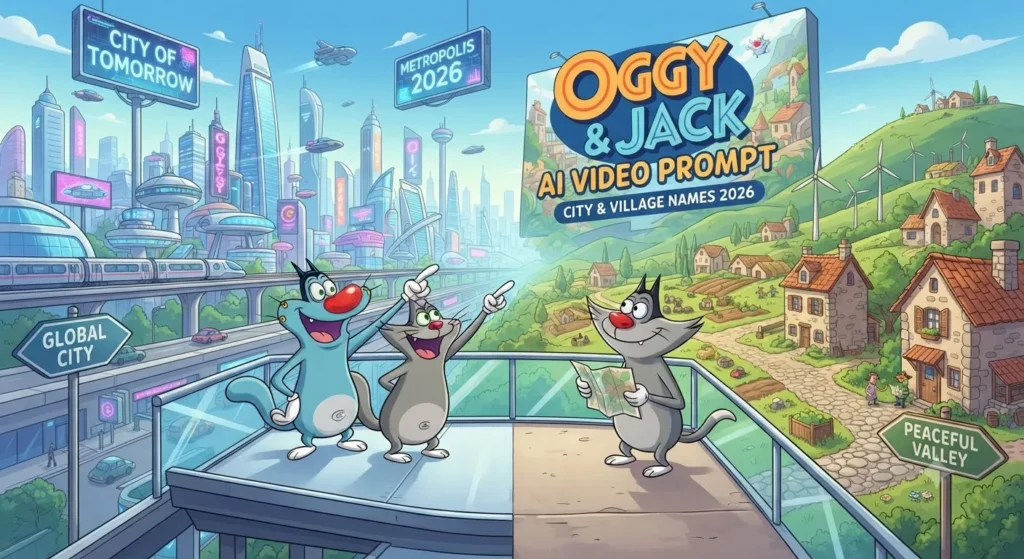
vsasingh.com par hum AI trends ko simple language mein explain karne ki koshish karte hain, taaki beginners bhi bina complicated editing knowledge ke naye ideas try kar saken. Is article mein hum dekhenge ki city ya village name ke saath Oggy and Jack style AI video ka concept kaise create kiya ja sakta hai, prompt kaise likhna hai, location board ko kaise customize karna hai, dialogue kaise banana hai aur final video ko Shorts/Reels ke liye kaise prepare karna hai.
Oggy and Jack AI Video Trend Kya Hai?
Simple words mein samjhein to ye ek AI-assisted cartoon video concept hai jisme recognizable cartoon-style characters ko kisi custom location ya situation mein imagine kiya jata hai. Iske baad characters ke beech funny conversation create ki ja sakti hai.
Video ka basic idea kuch aisa ho sakta hai:
- Characters ek naye city mein pahuchte hain.
- Road ke side location board dikhai deta hai.
- Ek character doosre se poochta hai ki hum kahan aa gaye.
- Background mein local environment दिखाई देता है.
- Characters funny situation create karte hain.
- End mein audience se next city ya village comment karne ko kaha jata hai.
Ye format short-form content ke liye suitable ho sakta hai kyunki ismein location + character + comedy + audience interaction ek saath aa jata hai.
Oggy and Jack AI Video Banane Ke Liye Kya Chahiye?
Is type ka video create karne ke liye aapko necessarily professional video-editing setup ki zarurat nahi hoti.
Aapko mainly chahiye:
- AI image generation tool
- AI video generation/animation tool
- Text-to-speech ya voice generation option
- Basic video editor
- Ek clear story idea
- Custom city/village name
- Vertical video format
Agar aap beginner hain, to pehle ek 5–10 second ka short scene create karke experiment karein. Jab output samajh mein aane lage, tab 15–20 second ka complete video banaya ja sakta hai.
Apni Location Choose Karein
Sabse pehle decide karein ki video mein kaunsa naam dikhana hai.
Aap use kar sakte hain:
- City name
- Village name
- District name
- Town name
- Tourist place
- School/college area
- Famous local location
Example:
City: Nagpur
District: Gaya
State: Uttar Pradesh
Village: Rampur
Town: Katihar
Agar aap local audience ko target karna chahte hain, to chhote village ka naam bhi interesting ho sakta hai. Actually kabhi-kabhi famous city se zyada attention kisi unusual village name par mil sakta hai, kyunki log comment karte hain: “Arey ye mere gaon ka naam hai!”
AI Image Prompt Mein Sirf Location Change Karein
Agar aapke paas already ek reference image ya scene hai jisme location board diya gaya hai, to customization ke waqt unnecessary changes avoid karna better hota hai. Aap AI ko clearly instruction de sakte hain:
Custom Board Prompt
AI Prompt:
Create the same cartoon-style scene with the characters, camera angle, background composition, lighting and overall visual appearance preserved. Change only the text written on the location signboard to “[YOUR CITY OR VILLAGE NAME]”. Do not modify the characters, clothes, poses, background objects or composition. Keep the location name clearly readable and correctly spelled.
“Change only the board text.”
Isse aap AI ko unnecessary redesign karne se rokne ki koshish kar sakte hain. Lekin dhyan rakhein ki AI-generated images mein text rendering kabhi-kabhi inaccurate ho sakti hai. Agar board par spelling galat aa jaye, to image ko dobara generate karna ya editor mein text manually add karna practical solution ho sakta hai.
Hindi Location Board Ke Liye Prompt
Agar aap Hindi mein location name dikhana chahte hain, to prompt ko thoda specific bana sakte hain.
Keep the complete scene unchanged and replace only the location sign text with “आपके शहर का नाम”. The Hindi text must be large, clean, centered and readable. Preserve the characters, expressions, clothing, background, lighting and camera framing exactly as much as possible. Do not add any additional text.
Example:
- “नागपुर”
- ya
- “गया”
- ya
- “हमारा गाँव – रामपुर”
Oggy and Jack Style AI Video Prompt
Aap apne AI video workflow mein is tarah ka fresh prompt experiment kar sakte hain:
Video Prompt
Create a short, colorful cartoon-style cinematic video featuring two funny animated characters arriving at a lively Indian town. Start with a wide establishing shot showing a road, small shops, trees, local traffic and a large entrance sign displaying “[CITY/VILLAGE NAME]”. Slowly move the camera toward the characters as they look around with curious and humorous expressions. One character points toward the location board while the other reacts with surprise. Add natural character movement, subtle body gestures, expressive faces and smooth animation. Keep the location board readable throughout the reveal. End with both characters looking toward the camera as if asking viewers which city or village they should visit next. Use bright daylight, clean cartoon visuals, smooth camera movement and a playful comedy mood.
Ye prompt kisi ek fixed city ke liye nahi hai. Aap [CITY/VILLAGE NAME] ko apne desired location se replace kar sakte hain.
Local City Version Kaise Banayein?
Agar aap kisi specific city ko target kar rahe hain, to sirf board par naam likhne ke bajay environment mein bhi local feel create kar sakte hain.
For example:
Nagpur concept
- City entry board
- Roadside shops
- Green surroundings
- Orange-themed local visual reference
- Cartoon characters exploring the city
Patna concept
- Busy urban road
- Local-style shops
- City entry sign
- Characters reacting to the crowd
Jaipur concept
- Warm architectural background
- Traditional-style city environment
- Decorative road elements
Lekin local references add karte waqt overloading avoid karein. Agar background mein bahut saari cheezein add kar di gayi to main characters aur location board less visible ho sakte hain.
Voiceover Kaise Add Karein?
Video ka visual ready hone ke baad dialogue ke liye voiceover add kiya ja sakta hai.
Aap:
- AI voice
- Recorded voice
- Character-style voice
- Text-to-speech
- mein se option choose kar sakte hain.
- Voice ko bahut fast na rakhein.
- Short dialogue ke beech thoda pause rakhein.
Example:
- “Bhai… ek minute!”
- Pause
- “Ye board kya bol raha hai?”
- Pause
- “Arre! Hum [CITY NAME] aa gaye!”
Is tarah dialogue zyada conversational feel kar sakta hai.
Background Music Kaisa Ho?
Funny cartoon-style video mein light comedy background music suit kar sakta hai.
Aap choose kar sakte hain:
- Playful beat
- Light percussion
- Funny cartoon sound
- Adventure-style music
- Local ambience
Music ko voiceover se louder na rakhein. Audience ko dialogue clearly sunai dena chahiye.
AI Prompt Mein Negative Instructions Kyon Add Karein?
AI generation mein kabhi-kabhi unwanted elements aa sakte hain.
For example:
- Extra characters
- Random text
- Duplicate objects
- Distorted hands
- Blurry faces
- Wrong signboard
- Flickering background
- Character design changes
Aap negative prompt ka use kar sakte hain.
Negative Prompt
blurry image, distorted characters, duplicate characters, extra people, unreadable signboard, incorrect spelling, random text, deformed face, inconsistent clothing, changing character design, flickering background, unnatural movement, low quality, excessive motion blur, cropped characters
Har AI tool negative prompt ko same tarah interpret nahi karta, isliye result tool ke according vary karega.
Ek Better Master Prompt
Agar aap ek detailed version try karna chahte hain, to ye prompt customize kar sakte hain:
Create a short vertical cartoon comedy video featuring two recognizable animated characters exploring an Indian town. The story begins with both characters walking along a colorful roadside environment. A large location entrance sign appears in the background displaying “[CITY OR VILLAGE NAME]” in clean, readable letters. The first character notices the sign and reacts with curiosity, while the second character responds with a humorous expression. Use smooth character animation, natural walking motion, expressive eyes, subtle hand gestures and playful body language. Slowly move the camera from a wide establishing shot toward a medium shot of the characters and location sign. Keep the characters consistent in appearance, clothing and proportions throughout the entire video. Preserve the exact location name and avoid random text. Finish with both characters facing the camera and inviting viewers to comment the name of another city or village they want to see in the next episode. Bright daytime lighting, colorful environment, clean animation, smooth motion, cinematic composition, vertical 9:16 format.
Video Ko Over-Edit Na Karein
AI video already visually busy ho sakta hai.
Agar aap:
- Too many transitions
- Flash effects
- Excessive text
- Heavy filters
- Loud music
- Multiple stickers
add kar denge, to original concept ka focus kam ho sakta hai. Location board aur characters ko hero elements banayein. Simple editing kai baar better result de sakti hai.
Reels Ke Liye Hook Ideas
Video ke first 1–2 seconds important hote hain.
Aap opening text ke liye ye ideas use kar sakte hain:
- “Oggy & Jack Aa Gaye Aapke City!”
- “Guess Karo Ye Kaunsa Shehar Hai?”
- “Aaj Oggy Jack Kahan Pahunche?”
- “Apne Village Ka Naam Comment Karo!”
- “Next Episode Tumhare City Mein?”
Ye lines video ke concept ke according customize ki ja sakti hain.
Copyright Aur Character Use Karne Se Pehle Ye Baat Samjhein
Oggy and Jack jaise established cartoon characters kisi existing entertainment property ka part hain. AI tool se character generate kar lena automatically ye prove nahi karta ki aapke paas un characters ke commercial rights aa gaye.
Agar aap personal experimentation ya social media content bana rahe hain, to platform rules, AI tool ki terms aur applicable copyright/trademark rules ko dhyan mein rakhna sensible hai. Agar aap commercial brand campaign, paid promotion ya monetized project ke liye content bana rahe hain, to original cartoon characters create karna comparatively straightforward creative route ho sakta hai.
Disclaimer: Oggy and Jack are registered trademarks of Xilam Animation. This post provides AI prompts for educational and creative purposes only and is not affiliated with or endorsed by the original creators
Original Character Prompt
Create two completely original cartoon characters for a comedy travel series. Character one is a playful blue animated cat-like creature with expressive eyes and a humorous personality. Character two is a smaller energetic orange cartoon creature with a curious expression. Give both characters unique designs, original clothing details and distinctive personalities. Place them on an Indian village road with a large signboard displaying “[LOCATION NAME]”. Use colorful animation, expressive body language, cinematic framing and a fun family-friendly atmosphere. Avoid copying any existing cartoon character design.
Ye approach ek separate original AI series develop karne ke liye use ki ja sakti hai.
AI Video Ko Human Touch Kaise Dein?
Sirf AI-generated visuals upload karne ke bajay thoda personal editing touch add karein.
For example:
- Apni voiceover
- Local joke
- City-specific dialogue
- Comment screenshots
- Custom intro
- Original background music
- Local slang
- Audience suggestions
Agar video mein aapke audience ke comments ka reference aata hai, to content zyada community-driven feel kar sakta hai.
10 Creative Location Ideas
Agar aapko next video ke liye idea nahi mil raha, to ye concepts try karein:
- Oggy & Jack at a village entrance
- Oggy & Jack visiting a busy city
- Oggy & Jack at a railway station
- Oggy & Jack entering a small town
- Oggy & Jack searching for a famous local food
- Oggy & Jack asking for directions
- Oggy & Jack getting lost in a village
- Oggy & Jack discovering their next city
- Oggy & Jack reading a giant city board
- Oggy & Jack asking viewers where to go next
FAQs
Oggy and Jack AI video kya hai?
Ye ek AI-assisted creative video concept hai jisme cartoon-style characters ko different locations ya situations mein show kiya jata hai. City ya village name ko story, signboard ya dialogue ke through customize kiya ja sakta hai.
Kya mobile se AI video bana sakte hain?
Haan, available AI image/video tools aur mobile editing apps ke combination se basic videos create kiye ja sakte hain.
Video ka ideal duration kya rakhein?
- Short-form content ke liye 10–20 seconds ka compact concept test kiya ja sakta hai. Exact duration aapki story aur platform ke according decide karein.
Kya AI video viral hone ki guarantee hai?
Kya AI video viral hone ki guarantee hai?
Nahi. Koi prompt ya editing technique viral views guarantee nahi karti. Audience interest, execution, timing, platform distribution aur originality jaise factors bhi matter karte hain.
Final
Oggy and Jack AI Video With City & Village Names ka concept basically personalization aur short-form storytelling ko combine karta hai. Ismein sabse interesting cheez ye hai ki aap ek simple cartoon-style idea ko apne city, town ya village ke according customize kar sakte hain.
Agar aap sirf ek AI-generated clip upload karenge, to video ordinary feel ho sakta hai. Lekin agar aap usmein location reveal, funny dialogue, smooth camera movement, voiceover aur audience interaction add karte hain, to overall presentation much better ho sakti hai.
Aise hi AI photo, AI video, editing prompts aur latest creative content ideas ke liye vsasingh.com Aapke city ya village ka naam kya hai? Comment mein zaroor batayein — ho sakta hai next AI video ka location wahi ho.
Leave a Reply