
AI video generation is changing the way creators turn simple photographs into short cinematic stories. Earlier, creating a fashion-style video required a camera, location, lighting, multiple shots, editing software, and plenty of time. Today, an White Rose AI Prompt video tool can help transform a reference image and a well-written prompt into a creative visual sequence.
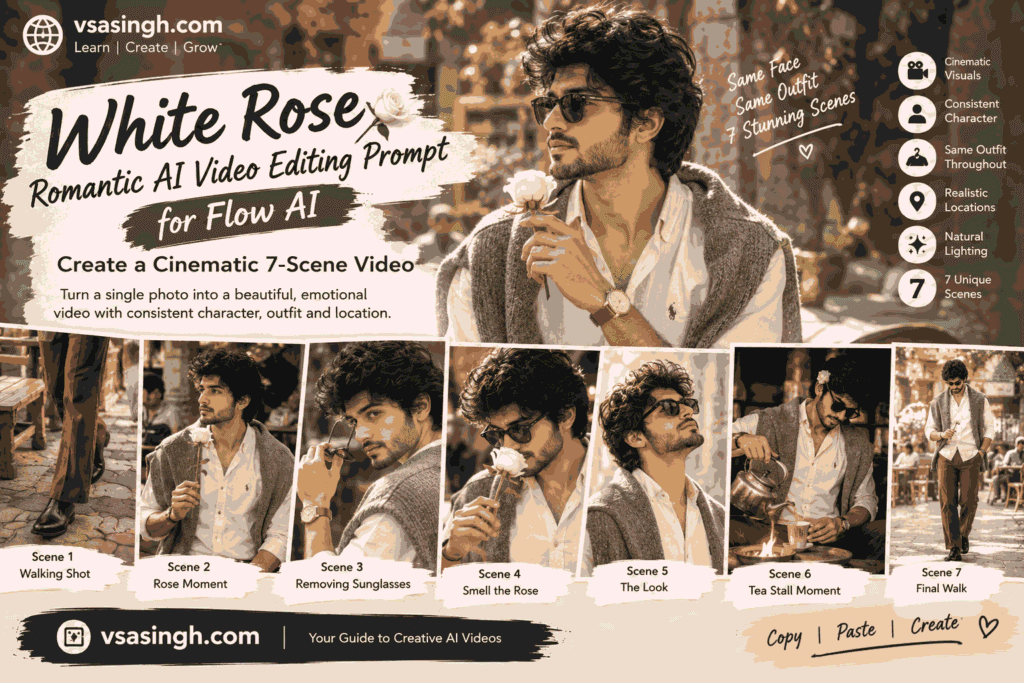
In this guide, vsasingh.com brings you a detailed White Rose Romantic AI Video Editing Prompt for Flow AI designed around a stylish seven-scene visual story.
The concept combines a classic fashion look, an old-world café environment, warm cinematic lighting, a white rose, sunglasses, traditional tea-making, and smooth camera movements. Instead of generating seven completely different clips, the prompt is structured around one consistent character and visual world.
That consistency is important.
One of the biggest challenges in white rose video prompt-generated video is keeping the same person, clothing, hairstyle, body proportions, location, and overall appearance from one scene to another. A character may look slightly different when the scene changes, or the outfit may suddenly change color. Sometimes the background can also shift unexpectedly.
A carefully organized prompt can reduce some of these inconsistencies by repeatedly establishing the important visual details.
This article explains the complete concept, how each scene works, how to customize the prompt, and how to create your own version for social media or creative projects.
What Is the White Rose AI Video Prompt?
The White Rose AI Video Prompt is a cinematic image-to-video concept where a person from an uploaded reference photograph becomes the central character in a short fashion-style story.
The white rose acts as the main visual element throughout the sequence.
The story begins outdoors on a vintage-looking café street. The character walks across tiled pavement, interacts with a white rose, adjusts his sunglasses, and moves through several close-up and medium shots. The story then briefly moves to a rustic tea stall before returning to the street for the final sequence.
The idea is not simply to make a person move.
Instead, the prompt attempts to create a connected visual sequence where every scene feels like part of the same video.
The overall atmosphere combines:
- classic fashion
- warm natural colors
- old-world architecture
- café culture
- white rose imagery
- cinematic camera movement
- realistic clothing
- natural body movement
- consistent character identity
This makes the concept suitable for creators who want something more interesting than a basic talking-head or simple walking animation.
Why Character Consistency Matters in AI Video
If you have experimented with white rose cinematic video AI Prompt, you may have noticed that keeping the same character consistent can be difficult.
For example, the first scene might produce a person with one hairstyle while the second scene changes the hair completely.
- The face can also become slightly different.
- Clothing may change from one frame to another.
- Body proportions can shift.
- Even the background can suddenly look like a different location.
- For a multi-scene story, these changes can make the final video feel disconnected.
- That is why this prompt begins with detailed reference-image instructions.
The uploaded photograph is treated as the primary visual reference for the character. The prompt asks the AI to maintain recognizable facial features, hairstyle, skin tone, height, and natural body proportions throughout the sequence.
However, creators should remember that cinematic fashion video prompt tools do not always guarantee perfect identity preservation. The final result depends on the model, reference image, settings, and generation process.
A clear reference photograph generally gives the system more useful visual information.
Complete White Rose AI Video Prompt
Below is a freshly structured version of the prompt for the complete seven-scene concept.
You can copy it into a compatible AI video editing prompts video workflow and customize the clothing, location, lighting, or camera movement according to your requirements.
Create a cinematic seven-scene fashion video using the uploaded reference image as the primary character reference.

CHARACTER CONSISTENCY:

Use the uploaded reference image to maintain the person's recognizable facial identity, hairstyle, skin tone, natural body proportions, height and overall appearance throughout the complete video.

Keep the character visually consistent from Scene 1 through Scene 7. Do not randomly change the face, hairstyle, clothing, body proportions or apparent age between scenes.

Maintain natural skin texture and realistic facial details. Avoid excessive beauty filters, artificial skin smoothing or plastic-looking skin.

OUTFIT:

Keep the same outfit throughout the entire sequence:

A cream-ivory button-down shirt, a relaxed grey knitted cardigan resting naturally over the shoulders, rust-brown wide-leg trousers, black pointed leather boots, a rose-gold wristwatch and stylish sunglasses.

The clothing should retain the same colors, materials, proportions and overall styling throughout all scenes.

LOCATION:

Create a charming old-world café street featuring weathered stone walls, rustic outdoor tables, wooden seating, hexagonal pavement tiles and a natural street atmosphere.

Include softly visible café visitors and passersby in the background.

For the indoor sequence, transition naturally into a small rustic tea stall with a traditional metal kettle, warm firelight and simple surroundings.

The outdoor and indoor locations should feel like connected parts of the same old-world environment.

VISUAL STYLE:

Photorealistic cinematic fashion video with natural warm colors, realistic skin tones, detailed fabric texture, believable reflections and smooth movement.

Use warm daylight outdoors and authentic firelight indoors.

Avoid black-and-white treatment, excessive desaturation, artificial HDR effects or unrealistic color shifts.

SCENE 1:

Begin with a detailed close-up of the character's lower body.

Show the black leather boots and rust-brown trousers moving naturally across hexagonal pavement.

The character takes several relaxed walking steps through the café street.

A rustic wooden bench appears nearby.

Use natural daylight and realistic foot movement.

Keep the camera low and allow the environment to remain softly visible around the subject.

SCENE 2:

Move to a close-up torso composition.

The character holds a single fresh white rose gently at chest level.

Keep the gesture natural and relaxed.

The sunglasses are not being worn in this moment.

A café table and a seated background customer appear softly out of focus behind the character.

Use shallow natural depth of field while preserving realistic clothing and rose details.

SCENE 3:

Transition into an over-the-shoulder close-up.

The character slowly removes the sunglasses with one hand and turns slightly toward the camera.

The movement should be smooth and natural.

Allow the rose-gold wristwatch to become visible during the gesture.

Use bright outdoor daylight with realistic reflections and subtle background blur.

SCENE 4:

Return to a close-up portrait.

The character wears the sunglasses again and gently raises the white rose toward the face.

Create a quiet, thoughtful fashion moment.

Keep the weathered stone café wall in the background with softly blurred people and tables.

The rose should remain clearly visible without appearing oversized or artificial.

SCENE 5:

Create another close-up focused on mood and fashion.

The character slightly tilts the head upward while wearing the sunglasses.

Natural daylight reflects softly across the lenses.

Keep the pose relaxed and confident without exaggerated movement.

Maintain the same clothing, hairstyle, face and environment.

SCENE 6:

Move indoors to a rustic tea stall that visually belongs to the same location.

The character prepares tea using a traditional metal kettle and pours it carefully into a small cup.

The white rose is placed naturally near the character's ear as a visual storytelling detail.

Warm firelight from the cooking area creates a cozy glow across the clothing and face.

Keep the sunglasses on and preserve the exact same outfit.

Show realistic steam, metal reflections and subtle firelight without exaggeration.

SCENE 7:

Return outdoors to the bright café street.

The character walks slowly toward the camera while holding the white rose close to the chest.

Begin with the head slightly lowered and then naturally raise the gaze toward the camera.

Keep café tables, stone walls and distant pedestrians softly blurred in the background.

Finish with a gentle cinematic camera pull-back, revealing more of the street while keeping the character visually important.

CAMERA:

Use smooth cinematic camera movement, realistic handheld micro-movement where appropriate, natural focus transitions and believable depth of field.

Avoid sudden camera jumps, unnatural motion or unrealistic body movement.

COLOR:

Use warm natural cinematic tones with balanced skin colors, soft golden highlights, realistic shadows and subtle contrast.

Keep outdoor daylight brighter and the indoor tea-stall scene warmer.

Do not use excessive orange-and-teal grading.

OUTPUT:

Widescreen 16:9 composition.

Ultra-realistic cinematic quality.

Detailed textures.

Natural movement.

Consistent character.

Smooth transitions.

The seven scenes should feel like one continuous fashion story rather than unrelated clips.
Understanding the Seven Scenes
The strength of this concept comes from the way the individual shots connect.
Instead of asking the AI to create seven random fashion shots, the story moves gradually from walking to interaction, from outdoor daylight to warm indoor firelight, and finally back outside.
Let’s understand each part.
The Opening Walk
The first shot does not immediately reveal everything.
Instead, it starts with the character’s shoes and trousers.
This creates a cinematic introduction.
The viewer sees black boots moving across the tiled pavement while the surrounding café environment slowly establishes the location.
A lower-angle shot can also make the opening feel more like a fashion film.
The walking movement should remain natural.
Avoid asking the AI for exaggerated runway-style movement unless that is specifically what you want.
For a realistic social-media video, a relaxed walking pace usually works better.
Introducing the White Rose
The white rose becomes the central visual element in the second scene.
The character holds it near chest level while standing in the café environment.
This gives the AI an opportunity to focus on the flower, clothing and upper body.
A softly blurred background helps maintain attention on the subject.
The rose should look like a real flower with:
- natural petals
- subtle shadows
- realistic texture
- believable size
- natural stem and leaves
Avoid describing it as extremely bright, glowing, magical, or oversized if your goal is photorealism.
A simple real-world flower often produces a more believable result.
The Sunglasses Transition
The third scene introduces movement around the face.
The character removes the sunglasses while turning slightly toward the camera.
This is useful from a storytelling perspective because the video shifts from a simple fashion introduction toward a more personal visual moment.
The rose-gold watch also becomes visible.
Small details like this can make the video feel more carefully produced.
However, hand movements can sometimes be challenging for AI video models.
If the generated hand looks distorted, simplify the instruction.
Instead of requesting several actions at once, ask for one slow movement.
For example:
Slowly lift one hand and remove the sunglasses with a natural movement.
Simple actions can sometimes be easier for the model to interpret.
The Rose Close-Up
This is the most recognizable part of the concept.
The character raises the white rose toward the face.
The camera stays close, allowing the flower, sunglasses, clothing and facial features to become the main visual elements.
You can make the shot softer by adding:
gentle background blur, warm natural daylight and subtle lens depth.
If you want a more dramatic fashion appearance, try:
soft directional sunlight with subtle highlights along the face and rose.
Keep the effect natural rather than overly theatrical.
A Quiet Fashion Moment
The fifth scene slows down the story.
The character looks slightly upward while sunlight reflects from the sunglasses.
This gives the video a pause before the location changes.
One advantage of including a slower scene is that it prevents the entire video from becoming a collection of constant movements.
Good cinematic videos often combine:
- movement
- stillness
- close-ups
- wider shots
- environmental views
That variation makes the sequence feel more intentional.
The Rustic Tea Stall
The sixth scene introduces a different atmosphere.
Instead of remaining outside, the character enters a small rustic tea stall.
The kettle, cup, fire and warm light create a strong visual contrast with the daylight outside.
This is also an opportunity to introduce realistic environmental details.
For example:
- gentle steam
- metal kettle reflections
- warm firelight
- wooden surfaces
- simple tea cup
- subtle background activity
The scene should still look connected to the previous environment.
The objective is not to suddenly transport the character into a completely different world.
The Final Walk
- The last scene brings the story back outdoors.
- The character walks through the same café street while holding the white rose.
- The camera gradually moves backward or pulls out, revealing more of the surroundings.
- This creates a natural ending.
- A good ending does not necessarily need dramatic action.
- A slow camera movement combined with a natural change in expression can be enough.
- The final frame can leave the viewer with the feeling that the story continues beyond the video.
Why the White Rose Works as the Main Visual Element
A recurring object can help connect different scenes.
In this concept, that object is the white rose.
The flower appears in multiple parts of the sequence, so it becomes a visual thread connecting the story.
You can apply the same idea to other objects.
For example:
- a book
- a coffee cup
- sunglasses
- a letter
- a vintage camera
- a flower bouquet
- a wristwatch
The important thing is to keep the object consistent.
If the AI changes the object between scenes, the continuity can become weaker.
Keeping the Outfit Consistent
Another important part of the prompt is the clothing.
The character wears the same general outfit throughout the story.
The outfit combines neutral and earthy colors:
- ivory
- grey
- rust brown
- black
- rose gold
These colors work naturally with an old-world café environment.
If you want to create your own variation, you can change the outfit while keeping the structure.
For example:
Casual Version
Cream shirt + blue jeans + brown shoes + sunglasses.
Luxury Version
Black shirt + tailored trousers + leather shoes + premium watch.
Traditional Version
Ivory kurta + beige trousers + traditional footwear.
Street Style Version
Oversized shirt + relaxed trousers + sneakers + sunglasses.
The important thing is to clearly tell the AI that the outfit should remain unchanged throughout the scenes.
How to Create a Female Version
The same storytelling structure can also be adapted for a female character.
Instead of changing the entire concept, modify the styling section.
For example:
Use the uploaded reference image as the character reference. Maintain recognizable facial identity, hairstyle, skin tone and natural proportions.

Outfit: elegant pastel saree with delicate embroidery, matching blouse, simple earrings, bangles and a small traditional accessory.

Keep the same outfit throughout all seven scenes.

The character carries a single white rose through the outdoor café sequence and interacts naturally with the flower.
The scene structure can remain similar while the fashion styling changes.
How to Create a Couple Version
For a couple version, both people should have separate reference images if the tool supports multiple references.
The prompt should clearly identify each person.
For example:
Use Reference A for Person 1 and Reference B for Person 2.

Keep both identities visually consistent throughout the complete sequence.

Do not merge facial features or randomly change clothing.

Maintain the same location, lighting and wardrobe continuity between scenes.
The story can then involve a shared café environment and the white rose as a simple visual prop.
Keep the interactions natural and non-explicit.
Making the Video More Cinematic
If you want a stronger fashion-film appearance, focus on camera language.
Useful instructions include:
slow camera push-in
gentle tracking shot
smooth camera pull-back
natural focus transition
subtle handheld movement
slow lateral camera movement
- You don’t need to include every camera movement in every scene.
- Too many camera instructions can make the prompt confusing.
- One clear movement per scene is usually easier to understand.
Lighting Ideas for Different Versions
Lighting can completely change the atmosphere.
Morning Version
Use:
soft early-morning daylight, gentle shadows and fresh natural colors
Afternoon Version
Use:
bright natural daylight with realistic contrast and warm highlights
Evening Version
Use:
soft golden-hour light with warm ambient shadows
Night Version
Use:
warm café lights, subtle street illumination and realistic low-light photography
Indoor Version
Use:
warm household lighting mixed with soft window light
Choose lighting according to the mood you want instead of adding multiple contradictory light sources.
How to Improve AI Video Realism
If the output looks too artificial, simplify the prompt.
Try adding:
natural human movement, realistic weight and balance, believable walking speed, subtle facial movement and physically consistent lighting.
For clothing:
realistic fabric movement and natural folds responding to body motion.
environment:
background elements remain stable while the character moves naturally through the scene.
For the camera:
realistic camera motion without sudden jumps or impossible perspective changes.
These instructions can help establish a more grounded visual direction.
Common Problems and Simple Fixes
Face Changes Between Scenes
Use the same reference image and repeat the identity instructions.
Outfit Changes
Describe the outfit once in detail and explicitly say that it remains unchanged.
Rose Changes Size
Specify:
realistic natural-sized white rose.
Hands Look Incorrect
Reduce complicated hand movements and use slower actions.
Background Changes
Describe the main architectural features of the location and repeat them when necessary.
Colors Become Too Strong
Use:
natural saturation, realistic white balance and restrained cinematic grading.
Video Looks Like an Animation
Add:
photorealistic live-action appearance, natural human motion and realistic camera optics.
Recommended Format for Social Media
The prompt above uses a 16:9 widescreen format, which is useful for landscape video.
If you are making content specifically for Reels or Shorts, you may want to adapt the composition to a vertical format.
For vertical content, use:
9:16
For standard landscape video:
16:9
For square social posts:
1:1
When changing the ratio, remember that the composition should also be adapted. Simply changing the number may not automatically reposition the character correctly.
Ideas for More White Rose AI Videos
Once you have created the first version, you can experiment with different storylines.
White Rose Café Story
Character walks into a café carrying a single rose.
White Rose Street Fashion
A fashion-editorial walk through a vintage street.
White Rose Garden Story
Character walks through a peaceful garden during golden hour.
White Rose Rain Scene
A cinematic outdoor scene with soft rainfall and an umbrella.
White Rose Evening Scene
Warm streetlights and café lights create an evening atmosphere.
White Rose Traditional Fashion
Replace the modern outfit with an elegant ethnic outfit.
Each version can follow the same basic principle: one character, one visual theme, consistent styling, and a clear beginning-to-end sequence.
A Simple Prompt Formula for Your Own AI Videos
If you want to create new concepts without copying a complete prompt every time, use this structure:
Reference Image + Identity + Outfit + Location + Main Object + Scene Sequence + Camera + Lighting + Color + Output Format
For example:
Use the uploaded reference image as the character reference.

Preserve recognizable identity and natural proportions.

Keep the same outfit throughout.

Place the character in a vintage café environment.

Use a white rose as the recurring visual element.

Create seven connected scenes showing walking, holding the rose, interacting with the environment and finishing with a cinematic camera pull-back.

Use warm natural lighting and realistic colors.

Maintain consistent character appearance and clothing.

Output in 16:9 cinematic format.
This formula gives you a foundation for creating your own prompts.
Tips Before Generating the Final Video
Before pressing the generate button, check the prompt once.
Make sure:
- the reference image is clear
- the character description is consistent
- the outfit does not change between scenes
- the main location is clearly described
- the important prop is identified
- camera movement is realistic
- lighting matches the environment
- the aspect ratio is correct
- the final scene provides a proper ending
If one generation does not look right, don’t immediately rewrite the entire prompt.
- Identify the exact problem.
- If the face changes, improve the identity instructions.
- If the clothing changes, strengthen wardrobe continuity.
- If the camera moves incorrectly, simplify the camera direction.
- If the background becomes inconsistent, provide more environmental details.
- This approach makes troubleshooting much easier.
Final Thoughts
The White Rose Romantic AI Video Editing Prompt for Flow AI is a creative example of how one reference photograph can become the foundation for a complete cinematic sequence.
Instead of relying on one static image, the concept creates a small visual story with a beginning, middle and ending.
The opening walking shot introduces the character. The white rose becomes the central visual element. The sunglasses and wristwatch add fashion details. The rustic tea-stall sequence changes the atmosphere without completely changing the visual world. Finally, the character returns to the café street for a slow cinematic ending.
The most important lesson is that a good AI video prompt is not simply a long collection of keywords.
It should have continuity, clear actions, consistent styling and a logical sequence.
When you describe the character, clothing, location, lighting and camera movement clearly, the AI has more information about the visual direction you want.
At vsasingh.com, we recommend treating prompts as starting points rather than fixed formulas. Try changing the outfit, flower, location, color palette or number of scenes and see how the story develops.
You can turn the white rose concept into a café fashion video, a traditional outfit sequence, a golden-hour street story, or a completely different creative theme.
Start with a clear reference image, keep the instructions consistent, make the movements simple, and refine the result one scene at a time.
Copy the prompt, customize the details, experiment with your own visual style, and create your next cinematic AI video with Flow AI.


Leave a Reply