
AI video generation ke saath ab cinematic-looking videos banana pehle ke mukable kaafi aasaan ho gaya hai. VIP BossWalk AI Video Aapko har baar expensive camera setup, actors ya kisi luxury location ki zarurat nahi padti. Sahi prompt aur AI video tool ki madad se ek simple idea ko bhi movie-style sequence mein badla ja sakta hai.
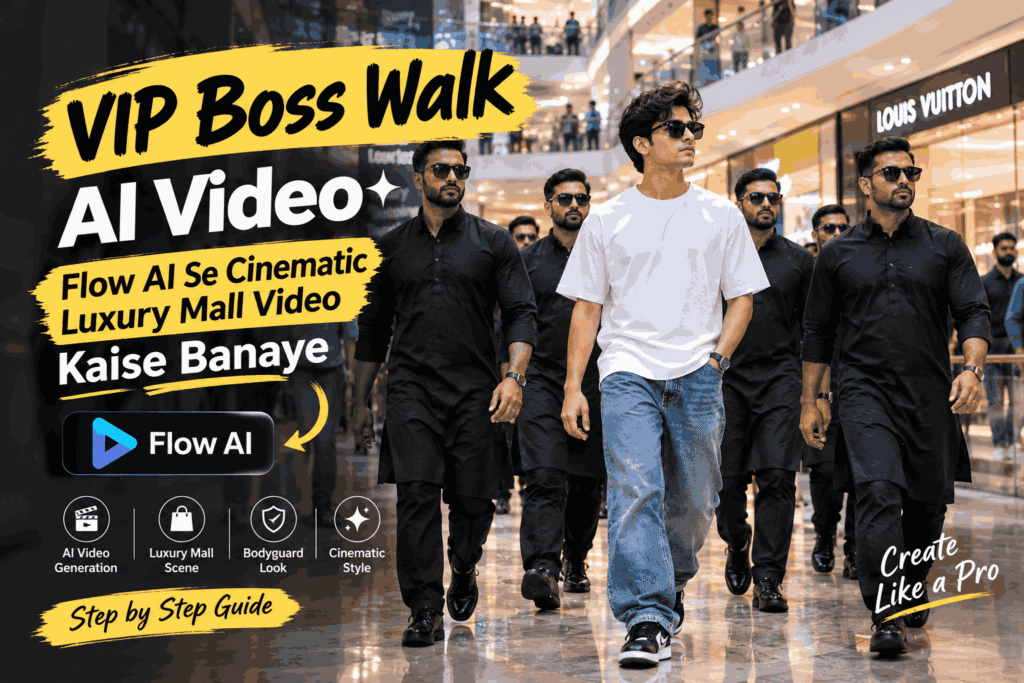
Aajkal VIP BossWalk AI Video ka concept isi wajah se kaafi attention grab karta hai. Is type ke video mein ek main character luxury location se confidently walk karta hai, jabki uske aas-paas bodyguards ya security team ka cinematic formation hota hai.
Is guide mein hum dekhenge ki Flow AI ki madad se aisa luxury mall bodyguard video kaise create kiya ja sakta hai, prompt mein kya details honi chahiye aur generation ke baad kin cheezon ko check karna chahiye.
VIP BossWalk AI Video Kya Hai?
VIP BossWalk ek cinematic video concept hai jisme main character ko ek important ya high-profile personality ki tarah present kiya jata hai.
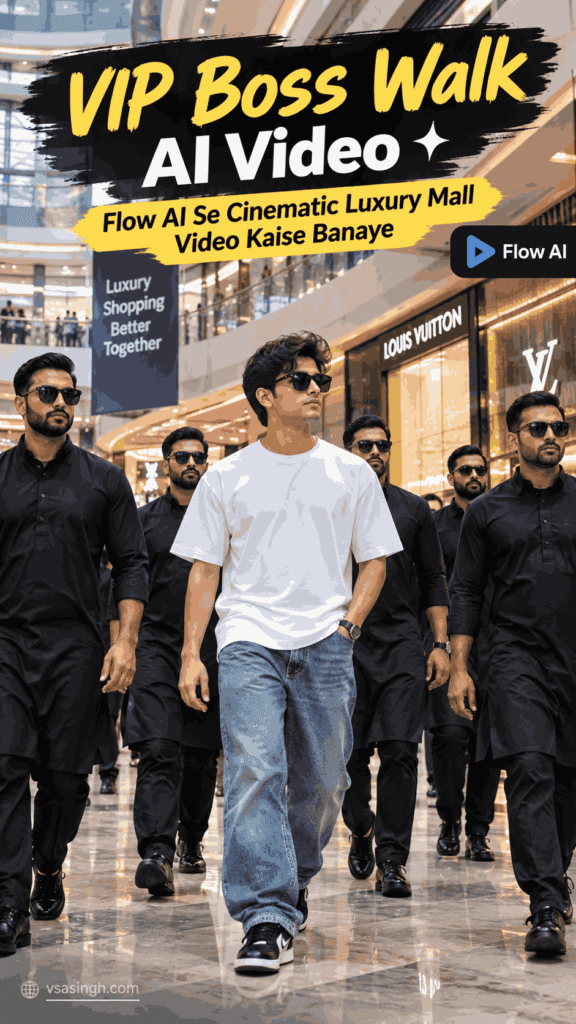
Character ke saath bodyguards coordinated manner mein move karte hain, camera dheere-dheere unke movement ko follow karta hai aur background mein ek premium location दिखाई देती है.
Is example mein humne setting ke liye ek modern luxury shopping mall ko choose kiya hai. Marble flooring, glass architecture, bright lights, premium stores aur background mein walking crowd video ko cinematic feel dene mein help karte hain.
Sabse important cheez ye hai ki scene over-dramatic na lage. Natural walking, realistic expressions aur smooth camera movement video ko zyada believable banate hain.
Is Concept Mein Kya Khaas Hai?
VIP walk videos mein ek simple walking sequence ko cinematic presentation milti hai.
Ek taraf luxury mall ka environment visual depth create karta hai, aur doosri taraf bodyguard formation main character ko scene ka clear focus banati hai. Agar camera movement bhi controlled ho, to result short-form social media content ke liye kaafi engaging ho sakta hai.
Is concept ko aap in platforms ya projects ke liye use kar sakte hain:
- Instagram Reels
- YouTube Shorts
- TikTok-style short videos
- AI video experiments
- Cinematic edits
- Personal creative projects
- AI video tutorials
Lekin achha result sirf “VIP walking in mall” jaise short prompt se nahi milega. AI ko character, location, clothing, lighting, camera movement aur overall mood ke baare mein clear instructions dena zyada useful hota hai.
Flow AI Ke Liye VIP BossWalk Video Prompt
Neeche ek original prompt diya gaya hai jise aap apne concept ke according modify kar sakte hain.
AI Video Prompt:
You can add this instruction to almost any prompt:
A cinematic ultra-realistic 8K video (9:16) of a young man wearing baggy relaxed-fit blue denim jeans, a plain white t-shirt, and black Nike sneakers, walking confidently through a large modern shopping mall surrounded by a group of six bodyguard-style entourage members, all dressed in matching black kurta-pajama traditional outfits with black formal shoes, some wearing black sunglasses, moving together as a tight protective formation around him, natural bright indoor mall lighting, rich full vibrant color grading throughout — realistic natural colors, not faded, not black and white, not desaturated. A small, subtle watermark reading 'NoorEditing07' stays fixed in the bottom corner throughout the entire video, minimal white or light-colored font, low opacity, appearing only once at all times.

CRITICAL: use the uploaded reference photo as the exact identity source for the main person — same face, same exact facial features, same natural smooth clear skin with absolutely no blemishes, marks, or texture flaws, and the exact same body type and build as shown in the uploaded photo, maintained precisely and identically in every single scene with zero facial drift or identity change. This must work accurately for any person of any age or body type who uploads their own reference photo — the generated face, skin, and body must always match the uploaded photo exactly, never a generic or different look.

Scene 1 (Low-angle wide shot, elevated curved walkway): He walks across a high curved walkway with white railings and an arched roof structure overhead, his black-clad entourage walking closely in a line ahead of and beside him, camera positioned low looking upward, dramatic architectural framing.

Scene 2 (Wide tracking shot, bright food-court corridor): He walks through a wide mall corridor with glowing neon shop signage, his entourage forming a loose protective formation around him, bustling background crowd, natural energetic mall atmosphere.

Scene 3 (Close group shot, tight formation): He walks at the center of his entourage in a tighter huddle, sunglasses on, calm confident expression, his bodyguards' shoulders and backs framing him closely on both sides, intense VIP energy.

Scene 4 (Wide shot from below, ascending atrium staircase): He and his entourage climb a curved mall staircase together, shot from a low angle looking up at the group, glowing mall signage and advertisement boards visible beside the stairs.

Scene 5 (High wide shot, multi-level atrium overlook): He and his entourage walk together across an open atrium level with glass railings, escalators and lower mall floors visible below, crowds of shoppers in the background, confident synchronized group walk.

Scene 6 (Wide shot from below, descending staircase): He and his entourage walk down a different mall staircase together, his white t-shirt standing out clearly among the black-clad group, bright storefronts and signage framing the stairs.

Scene 7 (Medium front tracking shot, final corridor): He walks directly toward the camera at the center of his entourage, calm composed expression, his group flanking him closely, mall crowd and shopfronts blurred in the background, cinematic slow zoom-out to finish.

Overall style: same face, same identity, same natural smooth skin, same exact body type as the uploaded reference photo for the main person, same baggy blue denim jeans, white t-shirt, and black Nike sneakers outfit consistent in every single scene, no outfit change, no identity or body change, same matching black kurta-pajama outfits for all entourage members present in every single scene, same real modern shopping mall location throughout with distinct architectural areas — elevated walkway, corridor, tight group formation, ascending staircase, atrium overlook, descending staircase, final corridor — natural realistic group walking movement with varied cinematic poses and genuinely distinct camera angles in every scene, realistic skin and fabric texture, rich full vibrant natural cinematic color grading with bright indoor mall lighting — full natural color throughout, not faded or desaturated — filmic depth and contrast, smooth cinematic transitions between poses, ultra-realistic premium 8K quality, vertical 9:16 format, continuous confident story flow from start to end, no scene skipped, only 7 scenes total exactly as described.
Overall Visual Direction
Keep the entire video photorealistic and cinematic.
Use natural human walking movements, believable body proportions, realistic fabric textures, physically believable lighting and smooth camera motion.
Maintain consistent character identity and clothing across all seven scenes.
Avoid distorted faces, duplicated people, extra limbs, unnatural walking, flickering objects, warped architecture, sudden outfit changes and inconsistent backgrounds.
Use a rich natural color grade with realistic indoor mall lighting. The final result should feel like a polished cinematic sequence rather than an obviously AI-generated video.
Format: 9:16 vertical video
Flow AI Mein Video Kaise Banaye?
Prompt ready hone ke baad actual generation process relatively simple hai. Lekin settings select karte waqt kuch basic points ka dhyan rakhna useful rahega.
Step 1: Prompt Ready Karein
Sabse pehle apne video ka complete prompt prepare karein.
Prompt mein sirf character ka description nahi, balki location, camera movement, lighting, bodyguard formation aur desired visual style bhi mention karein.
Agar aap character ko kisi specific reference image ke saath generate karna chahte hain, to prompt mein consistency ki requirement clearly mention karna useful ho sakta hai.
Step 2: Flow AI Open Karein
Flow AI ke video creation interface mein jaakar ek naya project ya video generation workflow start karein.
Interface aur available options platform updates ke saath change ho sakte hain, isliye buttons ke exact names har version mein same hona zaroori nahi hai.
Step 3: Video Format Select Karein
Agar aapka target Instagram Reels ya YouTube Shorts jaisa vertical content hai, to 9:16 format practical choice hai.
Website presentation ya normal YouTube video ke liye 16:9 format zyada suitable ho sakta hai.
Format hamesha us platform ko dhyan mein rakhkar choose karein jahan aap final video publish karna chahte hain.
Step 4: Prompt Paste Karein
Ab video generation ke prompt field mein complete description paste karein.
Koshish karein ki contradictory instructions na add karein. Agar ek line mein character ko formal suit pehnaya gaya hai aur doosri jagah traditional outfit diya gaya hai, to AI ko inconsistent instructions mil sakti hain.
Isliye prompt ko clear aur logically structured rakhna better hai.
Step 5: Reference Image Ka Use
Agar aap kisi particular character ki appearance maintain karna chahte hain aur aapke Flow AI setup mein reference-image feature available hai, to suitable reference image use ki ja sakti hai.
Reference image character ki visual consistency improve karne mein help kar sakti hai.
Kisi doosre person ki photograph use kar rahe hain to uske use ke liye permission hona zaroori hai.
Step 6: Video Settings Check Karein
Generation start karne se pehle available settings ko check karein.
Specially in cheezon par dhyan dein:
- Aspect ratio
- Video duration
- Available quality options
- Camera movement
- Reference image settings, agar available hon
Har setting ko unnecessarily complicated karne ki zarurat nahi hai. Ek clear prompt aksar better starting point deta hai.
Step 7: Video Generate Karein
Ab generation start karein.
AI-generated video ko complete hone ke baad sirf opening frame dekhkar judge na karein. Puri clip dekhein aur character consistency, bodyguard movement, background aur camera motion ko carefully check karein.
Generated Video Mein Kya Check Karein?
AI video ka first result hamesha perfect ho, zaroori nahi hai. Final video use karne se pehle kuch basic quality checks kar lena chahiye.
1. Character Consistency
Check karein ki main character ka face, hairstyle, clothing aur overall appearance shots ke beech suddenly change to nahi ho raha.
2. Bodyguard Movement
Bodyguards ka movement natural aur coordinated dikhna chahiye.
Agar koi person suddenly disappear ho jaye, duplicate ho jaye ya walking movement unnatural lage, to alternative generation try karna better rahega.
3. Mall Background
Mall ki architecture ko dhyan se dekhein.
Signs, shops, railings, stairs aur background objects mein sudden changes ya distortion ho to clip ko regenerate karna useful ho sakta hai.
4. Camera Movement
Camera movement smooth rehna chahiye.
Slow tracking, controlled camera pull-back aur gentle transitions is type ke cinematic walking sequence mein generally zyada natural feel dete hain.
5. Lighting
Different shots mein lighting bahut dramatically change nahi honi chahiye.
Polished floor, glass surfaces aur artificial mall lights ke reflections bhi believable lagne chahiye.
Video Ko Aur Cinematic Kaise Banayein?
Agar first generation theek hai lekin result ko aur polished banana hai, to prompt mein specific visual directions add ki ja sakti hain.
For example:
- Smooth tracking camera
- Natural walking motion
- Subtle depth of field
- Realistic reflections
- Soft cinematic lighting
- Controlled motion blur
- Detailed clothing texture
- Realistic crowd movement
- Premium architectural environment
- Film-style composition
Lekin ek common mistake se bachna chahiye: prompt ko unnecessary effects se bhar dena.
Bahut saari contradictory instructions AI ko confuse kar sakti hain. Clear, focused aur logically arranged description generally better starting point hoti hai.
VIP Walk Ke Different Versions
Ek hi concept ko different locations ke saath easily modify kiya ja sakta hai.
Luxury Hotel Version
Mall ki jagah ek premium hotel lobby use karein. Large chandeliers, marble flooring aur elegant interiors scene ko completely different mood de sakte hain.
Private Airport Version
Scene ko ek modern private airport terminal mein shift kiya ja sakta hai, jahan main character security team ke saath terminal se bahar ki taraf walk karta hai.
Business District Version
Luxury mall ki jagah modern skyscrapers wale business district ko background banaya ja sakta hai.
Red Carpet Version
VIP character ko ek cinematic event entrance ke liye use karein, jahan photographers aur security personnel background mein naturally present hon.
Is tarah ek hi basic idea se multiple short-form video concepts create kiye ja sakte hain.
Better AI Video Results Ke Liye Simple Tips
Main Character Ko Clearly Define Karein
“VIP person walking” jaise generic description ke bajay character ke clothing, expression aur movement ko clearly describe karein.
Location Detail Mein Batayein
Luxury mall kehna useful hai, lekin marble floor, glass architecture, storefront lighting aur background crowd jaise details AI ko scene samajhne mein additional context dete hain.
Camera Movement Specify Karein
Sirf “cinematic camera” likhne ke bajay actual movement batayein.
For example, slow backward tracking shot, low-angle shot ya smooth front tracking shot.
Simple Actions Rakhein
Walking jaisi natural movement ko AI comparatively easily reproduce kar sakta hai. Bahut complicated actions add karne se unwanted visual errors badh sakte hain.
Multiple Generations Try Karein
AI video generation mein experimentation important hai.
Ek version mein character achha ho sakta hai, doosre mein camera movement better aa sakta hai aur kisi teesre version mein background zyada realistic ho sakta hai.
Isliye ek hi generation par depend karne ke bajay kuch variations compare karna practical approach hai.
Final Video Ki Editing
AI se video generate hone ke baad aap basic editing ke through final presentation ko aur polished bana sakte hain.
Aap unnecessary frames trim kar sakte hain, timing adjust kar sakte hain, simple transitions add kar sakte hain aur suitable background audio ke saath final edit prepare kar sakte hain.
Short-form video mein opening aur ending ko clean rakhna especially useful hota hai.
Aap beginning mein simple title bhi add kar sakte hain, jaise:
VIP BossWalk AI Video
ya
Luxury Mall VIP Entry VIP BossWalk AI Video
Text ko minimal rakhein taaki video ke main subject ko cover na kare.
Kaunsa Aspect Ratio Choose Karein?
Aapka target platform yahan sabse important factor hai.
Instagram Reels aur YouTube Shorts: 9:16
YouTube videos aur website content: 16:9
Agar aap smartphone-focused short video bana rahe hain, to vertical format character aur walking action ko screen par prominently show kar sakta hai.
Wahin website article ya traditional YouTube video ke liye widescreen format environment aur mall architecture ko zyada space deta hai.
Final Thoughts
VIP Boss Walk AI Video ek relatively simple concept hai, lekin sahi prompt ke saath iska output kaafi cinematic feel de sakta hai.
Luxury mall, coordinated security team, confident walking style aur smooth camera movement milkar ek aisa visual create karte hain jo short-form content ke liye interesting ho sakta hai.
Is concept ki sabse achhi baat ye hai ki aap location, outfit, camera angle aur overall mood ko apni requirement ke hisaab se change kar sakte hain.
Agar first generation perfect nahi aati, to prompt ke individual elements ko gradually improve karein. Character consistency, natural movement aur realistic environment ko priority dena generally flashy effects add karne se zyada useful hota hai.
Leave a Reply