
Aajkal AI video generation sirf ek experiment nahi raha. Instagram Reels, YouTube Shorts aur social media par aapne aise bahut se videos dekhe honge jahan ek simple photo ko cinematic moving video mein convert kar diya jata hai. Mountain Walking AI Video Character wahi hota hai, lekin background mein mountains, clouds, greenery aur natural camera movement ke saath video bilkul travel-film jaisa feel deta hai.
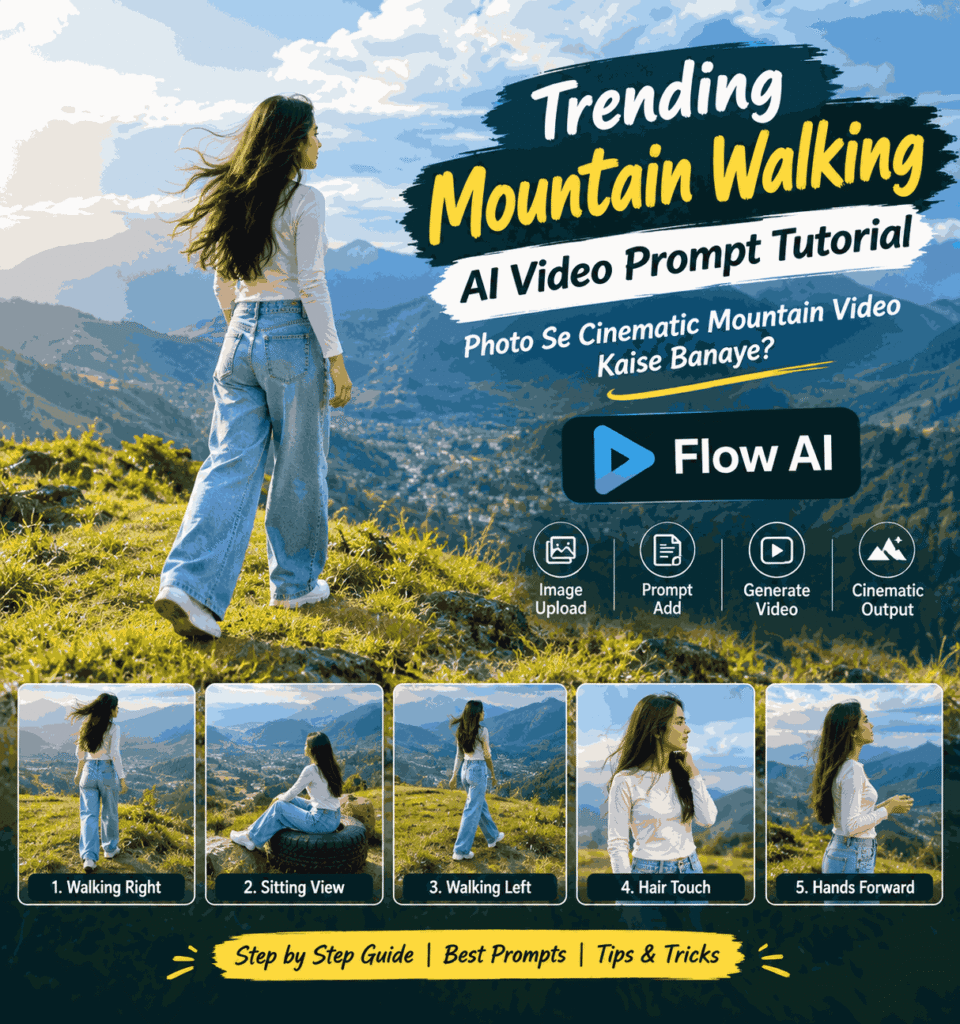
Isi type ka ek Mountain Walking AI Video trend kaafi interesting hai. Is concept mein ek normal photo ko use karke AI se aisa cinematic mountain sequence create kiya ja sakta hai jisme person green hills ke beech walk karta hua, mountains ko dekhta hua ya scenic location par relaxed pose mein nazar aata hai.
Sabse interesting baat ye hai ki iske liye aapko actual mountain location par jaane ki zarurat nahi padti. Agar aapke paas ek suitable photo hai aur aap AI video generator ko clearly batate hain ki character ko kaise move karna hai, camera kis direction mein hona chahiye aur environment kaisa dikhna chahiye, to AI ek impressive travel-style video create kar sakta hai.
Is article mein vsasingh.com par hum isi Mountain Walking AI Video trend ko simple language mein samjhenge. Saath hi dekhenge ki Google Flow jaise AI video tool mein prompt kaise use karna hai, photo select karte waqt kin baaton ka dhyan rakhna hai, cinematic result ke liye kya instructions deni chahiye aur final video ko social media ke liye kaise improve kiya ja sakta hai.
Mountain Walking AI Video Kya Hai?
Mountain Walking AI Video ek AI-generated cinematic video concept hai jisme kisi person ki photo ko animated video sequence mein transform kiya jata hai.
Normal photo mein person static hota hai. Lekin AI video generation ke through us photo ko walking, standing, looking around ya scenic environment enjoy karte hue dikhaya ja sakta hai.
Mountain version mein focus sirf character par nahi hota. Background bhi video ka important part hota hai. Green hills, distant mountains, valley, clouds, sunlight aur hawa jaise elements video ko realistic travel-video feeling dete hain.
For example, imagine kijiye ki aapke paas ek simple photo hai jisme ek person casual outfit mein khada hai. AI prompt ke through usi character ko ek elevated green mountain viewpoint par walking karte hue dikhaya ja sakta hai. Hair mein halki wind movement ho, clothes naturally move karein aur camera slowly character ko follow kare.
Isi combination ki wajah se video ek normal AI animation ke bajay cinematic travel footage jaisa feel kar sakta hai.
Ye AI Mountain Video Trend Itna Popular Kyu Hai?
AI video trends mein ek cheez common hai: simple input ko visually interesting output mein convert karna.
Mountain Walking trend mein bhi yahi concept kaam karta hai. Ek ordinary image ko cinematic environment aur controlled motion ke saath present kiya jata hai.
Is type ke videos mein kuch elements audience ka attention quickly attract karte hain:
- Beautiful mountain landscape
- Green hills aur valleys
- Natural sunlight
- Moving clouds
- Wind effect
- Walking motion
- Cinematic camera movement
- Travel-film style composition
- Consistent character appearance
Agar ye elements properly combine ho jayein, to ek short 8–10 second clip bhi kaafi premium look de sakta hai.
Lekin yahan ek important point samajhna zaroori hai. AI ko sirf “mountain par walking video banao” likhne se har baar perfect result nahi milega. Better output ke liye prompt mein character, location, movement, camera, lighting aur unwanted changes ke baare mein clear instructions dena useful hota hai.
Mountain Walking AI Video Banane Ke Liye Kya Chahiye?
Is trend ko try karne ke liye aapko bahut saare resources ki zarurat nahi hoti.
Basic level par aapko chahiye:
- Ek clear reference photo
- AI video generation tool
- Properly written video prompt
- Thoda patience for multiple generations
- Final editing ke liye video editor
Google Flow jaise tools image aur text instructions ke combination se AI video generation mein help kar sakte hain.
Aapki photo jitni clear hogi, character consistency maintain karna utna hi easy ho sakta hai. Agar face blurry hai, body ka major portion crop hai ya lighting bahut unusual hai, to AI ko character ko accurately recreate karne mein difficulty aa sakti hai.
Photo Select Karte Waqt In Baato Ka Dhyan Rakhein
AI video ka output sirf prompt par depend nahi karta. Input image bhi bahut important hoti hai.
1. Clear Face Wali Photo Use Karein
Aisi image choose karein jisme face clearly visible ho. Bahut low-resolution ya heavily blurred photo se identity consistency weak ho sakti hai.
2. Body Position Natural Ho
Agar aap walking video banana chahte hain, to full-body ya at least sufficient body framing wali image useful rahegi.
3. Outfit Clearly Visible Ho
Clothing AI ke liye ek visual reference ka kaam karti hai. Agar outfit clearly visible hai, to generated video mein same clothing maintain karna comparatively easier ho sakta hai.
4. Hair Style Clear Ho
Mountain scenes mein wind effect ke karan hair movement important visual element ban sakta hai. Isliye reference image mein hairstyle reasonably clear hona chahiye.
5. Background Bahut Complicated Na Ho
AI ko character aur environment separate karne mein easy ho, to clean image generally better starting point hoti hai.
Google Flow Mein Mountain Walking Video Kaise Banaye?
Ab actual process ki baat karte hain.
Sabse pehle Google Flow open karein aur video generation workflow mein apni suitable reference image add karein.
Uske baad prompt field mein apni requirements describe karein.
Prompt likhte waqt ek simple rule yaad rakhein:
AI ko sirf kya dikhana hai ye nahi, balki character ko kya karna hai aur camera ko kya karna hai, ye bhi batana chahiye.
For example, agar aap likhte hain:
“Create a mountain walking video.”
to AI ke paas bahut freedom rahegi. Ho sakta hai character ka outfit change ho jaye, walking direction badal jaye ya camera unnecessary movement karne lage.
Iske comparison mein detailed instruction AI ko desired visual direction samajhne mein zyada help kar sakti hai.
Mountain Walking AI Video Ke Liye Detailed Prompt
Neeche ek fresh prompt structure diya gaya hai jise aap apne reference image aur desired scene ke according customize kar sakte hain.
AI Video Prompt:
Create a cinematic 10-second landscape video based on the uploaded reference image. Keep the character visually consistent throughout the entire sequence, including facial identity, hairstyle, skin tone, body proportions and clothing. Do not introduce any additional people or change the character's appearance.

Set the entire sequence in a beautiful elevated green mountain viewpoint with rolling grassy hills, a distant valley, layered blue-green mountains and large soft clouds in the sky. Use bright but natural late-afternoon sunlight, realistic shadows, gentle atmospheric haze and a premium travel-film appearance.

Scene 1: Begin with a wide rear three-quarter view. The character is walking naturally across the grassy mountain viewpoint while looking toward the valley. Move gradually toward the right side of the frame. Keep the walking pace relaxed and realistic. Let the wind move the hair and clothing naturally while the camera follows smoothly from a scenic distance.

Scene 2: Cut to a wide shot at the same mountain environment. Show the character sitting sideways on a large dark circular object placed in the grass, with another similar reddish circular object nearby. Keep the pose relaxed and natural while the character looks toward the mountains and valley. Keep the camera mostly static and show the surrounding landscape clearly.

Scene 3: Make another clean cut to a rear three-quarter mountain shot. The character walks naturally toward the left side of the frame. Keep the body movement subtle, allow the hair to flow with the wind and maintain full-body framing. Use smooth lateral camera tracking.

Scene 4: Cut to a medium three-quarter shot with the mountain valley visible behind the character. The character stands calmly and gently adjusts the hair near one shoulder with one hand. Keep the expression relaxed and natural. Maintain soft wind movement and stable camera framing.

Scene 5: Finish with a medium-wide side profile. The character faces the mountain scenery and slowly brings both hands forward in a subtle natural gesture before holding the pose. Keep the camera steady and preserve the scenic mountain background.

Use realistic human movement, natural body weight shifts, believable cloth and hair motion, moving grass, soft atmospheric depth and authentic outdoor lighting.

Keep every scene separate and maintain the specified chronological order. Do not add dancing, spinning, exaggerated gestures, random walking, extra people or additional props.

Avoid face changes, identity drift, hairstyle changes, clothing changes, artificial transitions, excessive zoom, slow motion, speed ramps, text, subtitles, logos, watermarks, narration or dialogue.
Ye prompt ek fixed sequence ko target karta hai. Agar aapko sirf simple walking clip banana hai, to is detailed five-scene prompt ko short karke single-scene version bhi use kiya ja sakta hai.
Prompt Ko Apne According Customize Kaise Karein?
Har person ka video same nahi hona chahiye. Isi wajah se prompt ko customize karna useful hai.
Aap mountain environment ke saath different visual styles try kar sakte hain.
Green Hills
Agar aapko fresh aur peaceful travel vibe chahiye, to lush green hills, soft clouds aur natural daylight describe karein.
Sunset Mountain
Agar warm cinematic look chahiye, to late-afternoon ya golden-hour lighting use ki ja sakti hai.
Cloudy Mountain
Cloudy weather mountain videos ko dramatic appearance de sakta hai. Lekin lighting ko realistic rakhna important hai.
Valley View
Character ko foreground mein rakhkar distant valley aur mountains ko background mein show karne se cinematic depth create ho sakti hai.
High-Altitude Look
Aap prompt mein elevated viewpoint, distant layered mountains aur atmospheric haze jaise elements add kar sakte hain.
AI Video Mein Character Consistency Kaise Maintain Karein?
AI-generated videos ke saath ek common challenge character consistency hoti hai.
Ek scene mein character ka face sahi aa sakta hai, lekin next shot mein hairstyle ya outfit slightly change ho sakta hai.
Is problem ko reduce karne ke liye prompt mein repeatedly clear instructions dena helpful ho sakta hai.
For example:
- Same face
- Same hairstyle
- Same clothing
- Same body proportions
- Same character identity
- No additional people
- No outfit replacement
Reference image ko strict visual source ke roop mein define karna bhi useful ho sakta hai.
Lekin ek baat realistic expectation ke saath samajhni chahiye: detailed prompt ke baad bhi AI output har generation mein exactly identical ho, ye guarantee nahi hoti. Isliye first result perfect na aaye to prompt ko simplify karke dobara generate karna normal process hai.
Mountain Walking Video Mein Camera Movement Kaisa Rakhein?
Cinematic feel ke liye camera movement bahut important hai.
Agar camera har second random direction mein move karega, to video artificial feel kar sakta hai.
Mountain walking videos mein simple movements kaafi effective ho sakte hain.
Smooth Tracking Shot
Character ke walking direction ke saath camera ko smoothly follow karna natural travel footage jaisa feel deta hai.
Side Tracking
Agar character left ya right walk kar raha hai, to camera uske parallel move kar sakta hai.
Static Scenic Shot
Har shot mein camera move karna zaroori nahi hai. Kabhi-kabhi character ko static frame mein rakhkar background ko hero banana better hota hai.
Gentle Push-In
Standing pose wale shot mein very subtle camera push-in cinematic feel create kar sakta hai.
Wide Establishing Shot
Video ke beginning mein wide mountain view use karne se audience ko location ka sense milta hai.
Mountain Background Ko Realistic Kaise Banaye?
Mountain video ka main attraction hi landscape hota hai. Isliye background ko prompt mein clearly describe karna useful hai.
Aap in elements ka combination use kar sakte hain:
- Rolling green hills
- Distant valley
- Layered mountains
- Blue-green mountain ranges
- Large natural clouds
- Soft sunlight
- Atmospheric haze
- Grass movement
- Natural shadows
- Outdoor depth of field
Lekin har possible detail ek saath add karna zaroori nahi hai.
Kabhi-kabhi simple prompt better result deta hai. Agar prompt mein bahut zyada objects aur instructions hon, to AI kuch details ko ignore ya mix kar sakta hai.
Isliye pehle basic version generate karein. Result ko dekhkar additional instructions add karein.
Hair Aur Clothes Mein Natural Movement Kaise Add Karein?
Mountain location ka ek advantage wind effect hai.
Character ke hair ko slightly move karna aur clothing mein subtle movement add karna video ko static animation se zyada realistic bana sakta hai.
Prompt mein aap natural wind, gentle hair movement aur realistic fabric motion jaise instructions use kar sakte hain.
Lekin wind ko overdo karna avoid karein.
Agar hair bahut aggressively fly karega ya clothes unnatural tarike se move karenge, to AI video artificial lag sakta hai.
Goal ye hona chahiye ki viewer ko movement noticeable ho, lekin exaggerated na lage.
Walking Motion Realistic Kaise Rakhein?
Walking AI video mein sabse noticeable mistake body movement ho sakti hai.
Agar feet ground ke saath properly interact nahi karte, legs unnatural bend hote hain ya arms exaggerated move karte hain, to video immediately AI-generated feel de sakta hai.
Isliye prompt mein:
natural walking pace
realistic body weight shift
subtle arm movement
authentic footsteps
jaise concepts specify kiye ja sakte hain.
Walking direction bhi clearly define karein.
Agar character ko right side jaana hai to prompt mein RIGHT side clearly likhein. Agar next scene mein left direction chahiye, to usse separately mention karein.
Five-Scene Mountain Video Ka Structure
Agar aap ek short cinematic sequence banana chahte hain, to multiple shots ka combination video ko interesting bana sakta hai.
Scene 1 – Mountain Introduction
Video ko wide scenic shot se start karein. Character mountain landscape ke beech walking kar raha ho aur audience ko environment clearly dikhe.
Scene 2 – Relaxed Scenic Moment
Next shot mein character ko hillside par relaxed pose mein dikhaya ja sakta hai.
Scene 3 – Walking Continuation
Third shot mein different camera angle se walking sequence continue karein.
Scene 4 – Close Character Moment
Character ko standing pose mein show karein. Hair adjust karne ya scenery ki taraf dekhne jaisa subtle gesture add kiya ja sakta hai.
Scene 5 – Cinematic Ending
End mein side-profile ya medium-wide shot rakhein jahan character mountain scenery ki taraf dekhta hua nazar aaye.
Is tarah video mein beginning, movement, variation aur ending sab aa jata hai.
AI Generated Video Ko Check Karna Zaroori Hai
Video generate hone ke baad turant final maan lene ki zarurat nahi hai.
Pehle carefully dekhein ki character har scene mein consistent hai ya nahi.
Check karein:
- Face same hai?
- Hairstyle change to nahi hua?
- Clothes same hain?
- Walking direction correct hai?
- Hands natural hain?
- Feet properly move kar rahe hain?
- Background stable hai?
- Mountains scene-to-scene change to nahi hue?
- Camera movement smooth hai?
- Hair movement realistic hai?
- Extra people appear to nahi hue?
Agar sirf ek scene mein problem hai, to poore project ko change karne ke bajay us particular scene ko regenerate karna practical approach ho sakta hai.
Agar First Generation Perfect Na Ho To Kya Karein?
AI video generation mein first attempt ko final result samajhna zaroori nahi hai.
Kaabhi character ka face slightly change ho sakta hai. Kabhi walking motion unnatural aa sakta hai. Kabhi camera expected direction mein move nahi karta.
Aise case mein prompt ko aur complicated banane ke bajay pehle unnecessary instructions remove karne ki koshish karein.
For example, agar AI walking direction confuse kar raha hai, to prompt mein ek simple instruction rakhein:
“The character walks naturally toward the right side of the frame.”
Iske baad unnecessary camera actions kam karein.
Similarly, agar background unstable hai, to location description ko consistent rakhein aur har scene mein same environment reference karein.
Mountain Walking Video Ko Aur Cinematic Kaise Banaye?
AI generation ke baad bhi final video ko editing ke through improve kiya ja sakta hai.
Color Adjustment
Mountain footage mein natural greens aur blues important hote hain. Isliye colors ko over-saturate karne ke bajay subtle correction better ho sakta hai.
Background Music
Soft cinematic ya travel-style instrumental music video ke mood ko enhance kar sakta hai.
Clean Transitions
Multiple clips ko connect karte waqt simple cuts ya subtle transitions use karein.
Opening Shot
Video ke first second mein attractive mountain view audience ka attention capture kar sakta hai.
Ending
Last shot ko thoda longer feel dene se video ka ending moment stronger ho sakta hai.
Instagram Reels Ke Liye Mountain AI Video
Agar aapka main target Instagram Reels hai, to vertical format generally more suitable hota hai.
Aap AI generation ke time ya editing stage par vertical composition ko consider kar sakte hain.
Character ko frame ke center ya visually strong position mein rakhein aur mountain background ko itna space dein ki scene ka travel feel maintain rahe.
Short-form content mein first few seconds important hote hain. Isliye opening boring ya unnecessarily long na rakhein.
YouTube Shorts Ke Liye Tips
YouTube Shorts mein bhi short cinematic AI clips ka use kiya ja sakta hai.
Aap ek single mountain walking shot ke bajay 2–3 short clips combine kar sakte hain.
Example:
Clip 1: Wide mountain walk
Clips 2: Character looking at valley
Clip 3: Side-profile cinematic ending
In clips ko music ke beat ke according arrange karne se final Short more engaging ho sakta hai.
Different Mountain Walking Video Ideas
Ek hi prompt ko baar-baar use karne ke bajay aap concept ke multiple versions create kar sakte hain.
1. Morning Mountain Walk
Soft morning light, light clouds aur fresh green environment ke saath peaceful travel vibe.
2. Golden Hour Walk
Warm sunlight aur long natural shadows ke saath cinematic evening look.
3. Rainy Mountain Walk
Cloudy sky, wet grass aur misty mountain atmosphere ke saath dramatic visual.
4. Valley View Video
Character foreground mein aur massive valley background mein.
5. Couple-Free Solo Travel Concept
Sirf ek character ko mountain environment explore karte hue show karein.
6. Adventure Style
Mountain trail, stronger wind aur wider landscape shots ke saath adventurous feel.
7. Peaceful Travel Reel
Slow natural movement, calm expression aur scenic landscape par focus.
Common Mistakes Jo AI Mountain Video Banate Waqt Avoid Karni Chahiye
Bahut Short Prompt
Sirf “make a cinematic mountain walking video” likhne se AI ko kaafi creative freedom milti hai. Isliye desired movement clear karna better hai.
Bahut Zyada Instructions
Dusri taraf prompt ko unnecessarily complicated karna bhi problem create kar sakta hai.
Balance important hai.
Wrong Camera Direction
Character right ja raha ho aur camera usse opposite direction mein aggressively follow kare, to scene awkward lag sakta hai.
Overacting
Mountain travel video ke liye subtle expressions aur natural movement usually better fit hote hain.
Too Much Motion
Har element ko move karna zaroori nahi hai. Character, camera, clouds, grass aur hair sab ek saath aggressively move karenge to video artificial lag sakta hai.
Inconsistent Outfit
Agar outfit important hai to prompt mein same clothing maintain karne ki instruction include karein.
Random Objects
AI kabhi-kabhi background mein unwanted objects add kar sakta hai. Negative instructions is possibility ko reduce karne mein help kar sakti hain.
Kya AI Video Ko Real Travel Video Jaisa Banaya Ja Sakta Hai?
AI-generated footage ko realistic banane ke liye sirf high-quality landscape enough nahi hai.
Realism multiple small details se create hota hai.
For example:
- Character ka body weight natural shift ho
- Hair wind ke direction mein move kare
- Clothes movement body motion ke saath match kare
- Grass mein subtle movement ho
- Camera smooth ho
- Lighting consistent rahe
- Background atmospheric depth maintain kare
Jab ye details ek saath naturally work karti hain, tab final result more believable feel kar sakta hai.
Isi wajah se AI video prompts mein “cinematic” word add kar dena alone enough nahi hota. Cinematic appearance ko achieve karne ke liye visual details bhi describe karni padti hain.
Simple Version Prompt Chahiye To Ye Use Karein
Agar aapko five-scene detailed sequence nahi banana aur sirf ek simple mountain walking clip create karna hai, to ye shorter prompt try kar sakte hain:
Create a realistic cinematic mountain walking video from the uploaded reference image. Keep the character's face, hairstyle, clothing and identity consistent throughout the clip.

Show the person naturally walking across a beautiful green mountain hillside with a wide valley and layered mountains in the distance. Add soft natural sunlight, gentle wind moving the hair and clothes, realistic shadows, subtle grass movement and atmospheric depth.

Use smooth cinematic camera tracking and natural walking motion. Keep the expression relaxed and realistic. Make the scene feel like premium travel footage captured in real life.

Do not change the character's appearance or outfit. Do not add people, text, logos, watermarks or unnecessary objects. Avoid exaggerated movements, artificial camera motion and unnatural body movement.
Ye short prompt beginners ke liye comparatively easy starting point ho sakta hai.
AI Mountain Video Banane Ka Best Workflow
Agar aap regularly AI videos create karte hain, to ek fixed workflow follow karna useful rahega.
1: High-quality reference photo select karein.
2: Decide karein ki video landscape hai ya vertical.
3: Mountain environment choose karein.
4: Character movement define karein.
5: Camera movement decide karein.
6: Lighting aur weather describe karein.
7: Unwanted changes ke liye negative instructions add karein.
8: First generation create karein.
9: Result ko carefully review karein.
10: Problem wale scenes regenerate karein.
11: Best clips ko editor mein combine karein.
12: Music, color adjustment aur final crop ke baad export karein.
Is process se aap random generation ke bajay ek planned cinematic video create kar sakte hain.
Kya Har Photo Se Mountain Walking Video Banega?
Technically AI tools different types ki images ko animate karne ki koshish kar sakte hain, lekin har image equally suitable nahi hoti.
Agar photo mein subject bahut small hai, face hidden hai, body crop hai ya image quality poor hai, to output mein consistency problems aa sakti hain.
Isliye best practice ye hai ki starting image ko carefully choose karein.
Agar aapko specific walking pose chahiye, to full-body reference image helpful ho sakti hai.
Agar focus face aur upper-body cinematic shot par hai, to portrait image bhi kaam kar sakti hai.
Basically, aapko jo final shot chahiye, reference image ko us requirement ke close rakhna chahiye.
Kya Mountain Video Mein Apni Photo Use Kar Sakte Hain?
Haan, agar AI video tool aapko reference image upload karne ka option deta hai, to aap apni suitable photo ko creative video generation ke liye use kar sakte hain.
Lekin apni ya kisi aur ki image use karte waqt permission aur privacy ka dhyan rakhna important hai.
Public figure ya kisi doosre person ki image ko misleading context mein use karne se bachna chahiye.
AI ka best use tab hota hai jab aap creative storytelling aur visual experimentation ke liye technology ka use karte hain.
Mountain Walking AI Video Ke Liye Pro Tips
Tip 1: Ek Prompt Mein Ek Clear Goal Rakhein
Agar video walking ke baare mein hai to walking ko primary action rakhein.
Tip 2: Camera Ko Ignore Na Karein
Camera movement specify karne se shot ka composition improve ho sakta hai.
Tip 3: Natural Motion Use Karein
AI video mein small movements often large exaggerated actions se zyada realistic feel dete hain.
Tip 4: Same Environment Maintain Karein
Agar aap multiple scenes bana rahe hain, to mountain location ke visual elements ko consistent rakhein.
Tip 5: Multiple Generations Try Karein
Ek hi prompt ka different output aa sakta hai. Best version choose karna normal part of AI video workflow hai.
Tip 6: Editing Simple Rakhein
Beautiful mountain footage ko unnecessary effects se cover na karein.
Tip 7: First Frame Important Rakhein
Opening shot visually strong hona chahiye, kyunki wahi viewer ka initial attention capture karega.
Final Thoughts
Mountain Walking AI Video Prompt un creative AI trends mein se hai jahan ek simple photo ko completely different visual experience mein transform kiya ja sakta hai.
Aapko actual mountain location, expensive camera ya professional film crew ki zarurat nahi hoti. Ek suitable reference image, carefully written prompt aur thodi editing ke saath aap travel-style cinematic video create karne ki koshish kar sakte hain.
Lekin realistic result ke liye sirf prompt copy-paste karna enough nahi hai. Reference image ki quality, character consistency, walking direction, camera movement, lighting aur environment sab matter karte hain.
Mera suggestion ye rahega ki pehle simple single-scene video se start karein. Jab aapko AI tool ke movement aur character consistency ka idea ho jaye, tab multi-scene cinematic sequence try karein.
Aap mountain walking ke saath different concepts bhi experiment kar sakte hain—morning trek, sunset viewpoint, misty hills, valley exploration ya peaceful travel reel. Har variation ke liye environment aur camera instructions thodi change karke ek completely different mood create kiya ja sakta hai.
Aur sabse important baat: AI ko jitna clear visual direction milega, output ko desired result ke closer lane ki possibility utni better hogi.
Agar aap is trend ko Instagram Reel ya YouTube Short ke liye use kar rahe hain, to final editing ko clean rakhein. Soft music, appropriate framing aur simple cuts kaafi hote hain. Mountain scenery ko video ka main attraction banne dein.
AI video generation ka real advantage yahi hai ki aap apne ideas ko bina traditional production setup ke experiment kar sakte hain. Ek photo se shuru karke cinematic mountain story tak pahunchna ab kaafi accessible ho gaya hai.

Leave a Reply