
AI photo editing has changed the way people create portraits. Girl Candlelight AI Photo You no longer need an expensive camera, professional studio lights, or a complicated photography setup to experiment with cinematic photography. With the right reference image and a detailed AI prompt, an ordinary portrait can be transformed into a completely different visual concept.
One of the creative styles gaining attention among AI photo editing enthusiasts is the Girl Candlelight AI Photo Editing Prompt. This concept focuses on a dark cinematic environment where a single burning candle becomes the main source of light. Instead of showing the complete face clearly, the composition uses crossed forearms to cover the lower portion of the face, leaving the eyes, eyebrows, and forehead as the main visible features. The result can look mysterious, emotional, traditional, and cinematic at the same time.
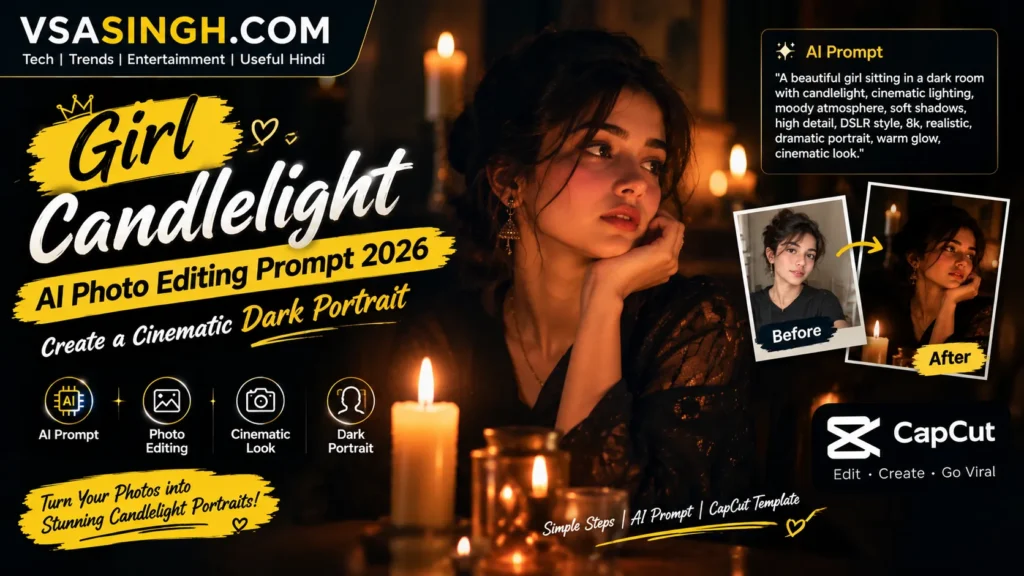
At vsasingh.com, we have created this guide for people who want to experiment with this style using their own reference photograph. The goal is not simply to add a candle to an existing image. The prompt is designed around the complete visual atmosphere—including candle placement, darkness, skin texture, hand positioning, bangles, shadows, facial expression, and camera composition.
In this article, you will find an original candlelight AI photo editing prompt, instructions for using a reference image, useful correction prompts, tips for getting realistic hands and jewelry, and ideas for creating different versions of the same cinematic portrait.
What Is Girl Candlelight AI Photo Editing?
Girl Candlelight AI Photo Editing is a creative AI portrait technique that places a female subject inside a very dark environment illuminated primarily by a small candle. Unlike a conventional portrait where the entire face is clearly visible, this concept intentionally hides part of the face. The subject’s forearms are positioned across the lower portion of the face, creating a naturally framed composition.
The visible eyes become the strongest feature of the photograph. A red candle positioned close to the camera provides a warm light source. The flame creates subtle golden highlights on the visible skin while allowing other areas of the image to fall into deep shadow.
Colorful glass bangles can be added around the wrists to introduce an Indian traditional aesthetic. Small hanging ghungroo-style charms can further enhance the styling without making the image look overly decorative. The overall appearance should resemble a professionally photographed low-light editorial portrait rather than an obvious AI-generated picture.
Best Girl Candlelight AI Photo Editing Prompt
Below is an original prompt prepared for this vsasingh.com guide. You can use it with a clear reference photograph in an AI image editing tool that supports image references.
AI Prompt
Create an ultra-realistic cinematic close-up portrait using the uploaded reference photograph as the primary identity reference. Preserve the woman’s recognizable facial identity, natural facial proportions, eye shape, eyebrow structure, hairstyle, skin texture, and overall appearance. Place the subject in an extremely dark environment with a nearly black background. The scene should appear to be illuminated primarily by one small burning red wax candle positioned very close to the camera in the left foreground. The candle should create a soft, warm, golden illumination across the visible portions of the woman’s face and arms. Keep the light physically believable, with natural falloff, subtle highlights, and deep shadows. Do not make the entire scene bright. Pose the woman in a close-up composition with both forearms crossed naturally in front of the lower portion of her face. The arms should cover the mouth and lower face while leaving the forehead, eyebrows, and both eyes clearly visible. She should look directly into the camera with a calm, quiet, confident and slightly mysterious expression. Keep the eyes realistic and naturally detailed. Add only subtle eyeliner and avoid heavy makeup. Decorate both wrists with multiple realistic Indian glass bangles in tasteful combinations of deep maroon, soft pink, pale green and white. Include a few delicate ghungroo-style hanging charms. The bangles should appear naturally worn and should reflect a very small amount of candlelight. Maintain realistic warm brown-golden skin tones, visible natural skin texture, realistic pores, natural facial details and authentic low-light photography characteristics. Use dramatic chiaroscuro lighting with strong contrast between warm candlelit areas and deep shadows. The candle flame should remain small and physically realistic. Keep the background completely dark and free from furniture, windows, decorations, artificial lights or distracting objects. Make the arms, wrists and fingers anatomically accurate. Avoid extra fingers, merged fingers, duplicated hands, distorted wrists or unnatural joints. Maintain realistic proportions throughout the image. The final result should look like a professional cinematic editorial photograph captured in extremely low light using a high-quality camera and realistic lens depth. Preserve the original identity from the reference photograph. Do not replace the person’s face or create a different person. Style: photorealistic, cinematic, intimate, mysterious, traditional Indian aesthetic, realistic candlelight photography, natural skin texture, deep shadows, subtle warm highlights, professional editorial portrait. Aspect Ratio: 16:9.
How to Use the Candlelight AI Photo Editing Prompt
Using this concept does not require advanced photo-editing skills. The most important part is choosing a suitable reference image and giving the AI enough information about the desired composition.
Step 1: Select a Clear Reference Photo
Choose a photograph where the person’s face is clearly visible.
A front-facing or slightly angled portrait usually works well because the AI can identify facial features more easily.
Try to avoid:
- Extremely blurry photographs
- Very low-resolution images
- Photos with heavy filters
- Faces hidden behind sunglasses
- Strong motion blur
- Photos where the subject is extremely far away
- Images with extreme facial distortion
A clean reference image generally gives the AI more useful information about the person’s appearance.
Step 2: Upload the Reference Image
Open your preferred AI image editing platform and upload the photograph you want to transform. If the platform allows you to specify an image as a reference or identity image, use that option. The purpose is to tell the AI that the uploaded photograph should influence the identity of the final portrait.
Step 3: Paste the Full Prompt
Copy the complete prompt from this article and paste it into the image-generation or editing interface. Do not remove important details such as the candle position, crossed arms, dark background, or identity-preservation instructions if you want to maintain the intended composition.
Step 4: Generate the Image
Start the image generation process. Depending on the AI platform and image complexity, the first result may not be perfect. That is normal. AI-generated images can sometimes produce small mistakes in hands, jewelry, candle flames, shadows, or facial details. Instead of changing everything at once, identify the specific part that needs correction.
How to Fix Incorrect Hands and Fingers
Hands are often one of the most difficult parts of AI-generated images. Because this concept requires both forearms to appear close to the face, the AI may occasionally produce unnatural fingers or wrist positions. If that happens, use a targeted correction prompt.
Hand Correction Prompt
Keep the woman’s face, identity, candle, lighting and overall composition unchanged. Correct only the arms, wrists and hands. Make both forearms anatomically realistic with natural wrist angles, correctly formed fingers and believable proportions. Remove extra fingers, duplicated fingers, merged fingers and unnatural joints. Keep the glass bangles in their original positions and preserve the existing candlelight shadows.
This approach tells the AI that you want to fix a specific area instead of redesigning the entire portrait.
How to Keep the Original Face
One common issue with AI photo editing is that the generated person may look similar to the reference but not exactly like the original subject. To reduce unnecessary changes, add a stronger identity instruction.
Face Preservation Prompt
Preserve the exact recognizable identity of the person in the uploaded reference photograph. Do not redesign or replace the face. Maintain the same eye shape, eyebrow structure, facial proportions, nose structure, natural skin texture and recognizable facial characteristics. Only change the environment, lighting, pose and styling required by the candlelight concept.
This is particularly useful when your main purpose is to transform an existing portrait rather than generate an unrelated character.
How to Make the Candle Look Realistic
The candle is one of the most important elements in this composition. If the flame becomes too large or the glow becomes excessive, the image can start looking artificial.
A realistic candle should have:
- A relatively small flame
- A visible wax body
- Subtle warm illumination
- Natural light falloff
- Soft reflections
- Shadows that respond to the flame’s position
If the AI makes the candle excessively bright, try this:
Reduce the candle’s brightness and glow. Keep the flame small, realistic and physically believable. Maintain deep darkness throughout the background. Allow only subtle warm illumination to reach the subject’s face and arms. Avoid an excessive orange or red color cast.
Tips for Getting More Realistic AI Photos
A good prompt is important, but it is not the only factor that affects the final result.
Use a High-Quality Reference
The clearer the reference image, the more information the AI has about the person’s appearance.
Don’t Overload the Prompt
Detailed instructions are useful, but adding dozens of unrelated effects can confuse the intended composition.
Make One Change at a Time
If the first image has good lighting but bad hands, correct the hands instead of changing the lighting, face, background and accessories simultaneously.
Check the Eyes
Because the lower face is hidden, unnatural eyes can immediately make the image look artificial.
Check the Hands
Always zoom into the hands and fingers before using the final image.
Check the Candle
The flame, wax and shadows should look physically consistent.
Avoid Excessive HDR
Too much artificial sharpness or HDR-style processing can make skin look plastic.
How to Create a More Mysterious Version
If you want the portrait to feel more mysterious, reduce the amount of visible facial area. You can modify the composition so that the arms cover slightly more of the lower face while keeping both eyes visible. You can also reduce the candle’s intensity and increase the darkness around the subject.
A useful instruction is:
Create a more mysterious low-light atmosphere while keeping both eyes clearly visible. Reduce ambient illumination, deepen the surrounding shadows and maintain subtle candlelight on the subject. Do not hide the eyes.
How to Create a Soft and Elegant Version
For a softer portrait, avoid extremely hard shadows.
Ask for:
Use gentle candlelight with soft shadow transitions, subtle warm highlights and a refined editorial photography mood. Keep the background dark but avoid excessively harsh contrast on the skin.
This produces a more elegant appearance while preserving the original concept.
Can This Prompt Be Used With Your Own Photo?
Yes, the concept is designed around using a reference photograph. The important point is to use a photo that you have the right to edit and use. If you are creating a portrait for a website, social media account or portfolio, make sure you have permission to use the source photograph, especially when it contains another person. For personal creative experiments, a clear photograph of yourself can work particularly well because you can compare the final AI portrait with the original reference.
FAQs
What is the Girl Candlelight AI Photo Editing Prompt?
What is the Girl Candlelight AI Photo Editing Prompt?
It is a detailed AI image-editing prompt designed to transform a reference portrait into a dark cinematic image illuminated primarily by a candle.
Can I use my own photograph?
Can I use my own photograph?
Yes. A clear reference image can be used to guide the AI toward maintaining the subject’s recognizable appearance.
Why is the background dark?
Why is the background dark?
The dark background makes the candlelight, eyes and crossed arms the main visual elements of the portrait.
Why are the arms placed across the face?
Why are the arms placed across the face?
The pose creates a mysterious composition and naturally hides the lower portion of the face while emphasizing the eyes.
Can I change the candle color?
Can I change the candle color?
Yes. Red, cream, white, orange or other candle colors can be experimented with depending on the mood you want.
Can I change the bangle colors?
Can I change the bangle colors?
Absolutely. You can replace the suggested maroon, pink, green and white combination with another color palette.
Why does AI sometimes create bad fingers?
Why does AI sometimes create bad fingers?
Hands and fingers contain complex shapes and relationships, so image-generation systems can occasionally produce anatomical errors. A targeted correction prompt can help.
Final
A small red candle in the foreground creates the main light source. The crossed forearms add depth while hiding the lower portion of the face. The colorful glass bangles bring a traditional touch, while the dark background keeps attention on the subject.
For the most realistic result, start with a clear reference image and make sure the AI understands that the original identity should remain unchanged. After generating the first version, carefully inspect the hands, fingers, eyes, jewelry and candle. If something looks incorrect, use a targeted correction prompt instead of regenerating the entire concept from scratch.
You can also experiment with different candle colors, bangle combinations, camera distances, expressions and aspect ratios. A single concept can therefore produce several unique versions for Instagram, Facebook, YouTube, personal portfolios or creative photography projects.
AI image editing works best when you treat the prompt as a creative direction rather than a fixed formula. Small changes in lighting and composition can completely change the mood of the final portrait. This Girl Candlelight AI Photo Editing Prompt is created as an original creative guide for readers of vsasingh.com. If you try the concept, experiment with the lighting and composition while keeping the image natural and realistic.



Leave a Reply