
AI video generation has changed the way people create stylish social media content. What once required a camera, a location, professional lighting, multiple outfits, and several hours of editing can now be explored with a reference image and a carefully written Kurta Walk AI Prompt.
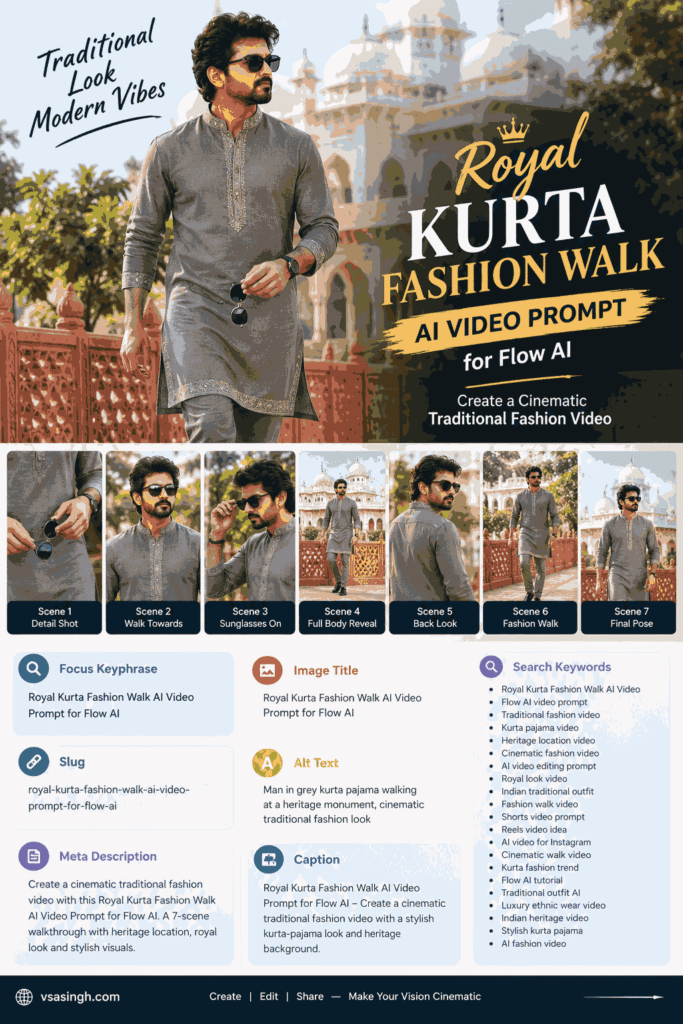
One of the most interesting styles gaining attention is the Royal Kurta Fashion Walk AI Video. The concept combines traditional Indian fashion with cinematic camera movements, heritage architecture, natural lighting, and a polished fashion-film look.
If you want to create a similar video using your own reference photo, this Royal Kurta Fashion Walk AI Video Prompt for Flow AI can help you build a seven-scene sequence with a consistent character, outfit, environment, and visual style.
At vsasingh.com, we focus on making AI prompts easier to understand and use. Instead of simply sharing a prompt, this guide explains what the prompt is designed to achieve, how the scenes work together, how to prepare your reference image, and what you should check after generating the video.
Note: If you are creating a video featuring yourself, use your own photo or an image for which you have permission. AI-generated results can vary between generations, so identity and visual consistency should always be reviewed before publishing.
What Is the Royal Kurta Fashion Walk AI Video Trend?
The Royal Kurta Fashion Walk concept is essentially a short cinematic fashion sequence built around traditional Indian clothing.
The main character wears a sophisticated grey kurta-pajama outfit and moves through a heritage-inspired location. Instead of showing the same camera angle throughout the video, the sequence moves through several compositions, including detail shots, walking frames, profile views, full-body shots, and a final composed portrait.
The result is intended to feel less like a basic AI-generated clip and more like a short fashion-film sequence.
This type of video can work well for:
- Instagram Reels
- YouTube Shorts
- Vertical fashion videos
- Traditional outfit showcases
- Personal profile content
- AI video experiments
- Festival-related content
- Wedding-fashion inspiration
- Cultural fashion edits
- Cinematic social media posts
The biggest advantage of this concept is that it does not depend on complicated action or an unrealistic environment. wedding kurta fashion walk ai video prompt The visual appeal comes from clothing, architecture, composition, movement, and consistency.
Why a Detailed AI Prompt Matters
Many people assume that an AI video generator only needs a short instruction such as:
“Create a man walking in a Royal kurta fashion walk video AI Prompt.”
That may produce a video, but it gives the model very little information about the exact visual direction.
A more detailed prompt can define several elements at once.
For example, the prompt can describe:
- The reference person’s appearance
- Clothing and accessories
- Background architecture
- Lighting conditions
- Camera perspective
- Walking direction
- Facial expression
- Color treatment
- Scene continuity
- Video orientation
- Overall cinematic mood
When these details are planned together, the generated clips have a clearer visual identity.
Of course, a detailed prompt cannot guarantee that every AI generation will be perfect. Artificial intelligence can still change small facial details, accessories, hands, clothing patterns, or background elements. That is why reviewing and regenerating individual scenes is often part of the creative process.
The Visual Concept Behind This Prompt
The idea behind this prompt is to create a sophisticated traditional fashion video without making the scene overly complicated.
The character is dressed in a grey kurta-pajama with subtle silver embroidery. The setting is an elegant heritage-style courtyard featuring white architectural elements, decorative arches, greenery, and red sandstone details.
The contrast between the neutral clothing and historic architecture gives the video a premium traditional appearance.
The camera gradually moves between different perspectives so that every scene contributes something new.
The sequence begins with small visual details and eventually reveals the full character.
This creates a simple storytelling progression:
Detail → Introduction → Transformation → Full Reveal → Personality → Walk → Final Pose
That structure is useful for short-form videos because viewers are not shown the complete composition immediately.
Recommended Character Setup
The reference image is an important part of the workflow.
Instead of asking the AI to invent a completely new person, the prompt is designed around an uploaded reference photograph.
For a personal video, choose an image where your face is clearly visible and the photograph represents your normal appearance. Royal Kurta Fashion Walk AI Video Prompt
A useful reference image generally has:
- Clear facial visibility
- Reasonable lighting
- Minimal filters
- No major obstruction across the face
- Visible hairstyle
- Natural-looking proportions
- Sufficient image quality
Avoid relying on an extremely edited photograph with heavy beauty filters if your goal is to maintain a recognizable appearance.
The reference photo should give the AI enough information to understand the visual identity you want to preserve.
However, it is worth remembering that AI video systems do not behave like traditional photo-editing software. Even with a good reference, some variations can appear between generated frames.
Royal Kurta Outfit Design
The clothing is one of the most important visual elements in this concept.
The suggested outfit is a grey kurta-pajama set with a mandarin-style collar and subtle silver embroidery.
The embroidery should remain elegant rather than becoming excessively decorative.
The matching straight-fit pajama maintains the traditional appearance while keeping the overall silhouette clean.
Black formal slip-on shoes complete the look.
The character also carries sunglasses during the opening scenes before eventually wearing them.
Keeping the outfit unchanged across the sequence is important.
If one scene suddenly changes the kurta color or introduces a completely different style, the final edit may feel like several unrelated videos placed together.
Heritage Location and Background
The location is designed around an elegant Indian heritage atmosphere.
The visual environment can include:
- White domed architectural elements
- Decorative stone arches
- Red sandstone details
- Carved jaali-style railing
- Green trees
- Open courtyard space
- Soft natural daylight
The purpose is not simply to create a beautiful background.
The architecture also helps establish the mood of the video.
Traditional clothing combined with historic-looking architecture naturally creates a cultural and royal visual language.
The background should remain visually consistent between scenes. If every shot suddenly changes to a different building, garden, or street, the sequence may lose continuity.
Complete Royal Kurta Fashion Walk AI Video Prompt
Below is a newly structured version of the prompt created for this article.
You can adapt the wording according to the capabilities of the AI video tool you are using.
AI Video Prompt
Use the uploaded reference image as the primary visual reference for the main character. Preserve the person's recognizable facial appearance, hairstyle, natural complexion, general body proportions, and overall visual identity throughout the complete sequence. Do not intentionally transform the character into a different person.

The character should maintain a natural and realistic appearance rather than looking excessively retouched or artificial.

Keep the wardrobe consistent throughout the sequence: an elegant grey kurta-pajama outfit with a refined mandarin collar, subtle silver embroidery around the collar and lower kurta border, matching straight-fit pajama trousers, and black formal slip-on footwear. The character carries stylish sunglasses during the opening moments and later wears them naturally.

Maintain the same general heritage courtyard environment throughout the complete video. The setting features elegant white domed architectural structures, decorative arches, red sandstone elements with carved jaali patterns, green trees, and an open outdoor courtyard.

Use soft natural daylight with realistic shadows. Keep skin tones natural and preserve realistic fabric texture. Use a rich but believable cinematic color treatment with clean details, balanced contrast, and natural-looking colors.

The entire sequence should feel like one continuous premium traditional fashion film.

Scene 1 — Fashion Detail Introduction

Begin with a close cinematic shot focused on the character's hands as he walks slowly through the heritage courtyard.

He is holding his sunglasses near waist level.

The lower portion of the grey kurta should be visible, including the delicate silver embroidery along the hem.

The background contains soft greenery and architectural details with shallow depth of field.

Keep the camera movement smooth and subtle.

The purpose of this opening shot is to introduce the outfit before revealing the character's face.

Scene 2 — Walking Toward Camera

Move to a medium shot as the character walks naturally toward the camera.

He holds the sunglasses with both hands around chest level.

The embroidered mandarin collar is clearly visible.

The background contains a light-colored architectural wall and greenery, softly blurred to maintain attention on the character.

His expression should remain calm and composed.

Avoid exaggerated facial expressions.

Scene 3 — Sunglasses Moment

Transition into a side-profile close-up.

The character slowly raises the sunglasses and places them on his face using one hand.

Capture the movement naturally.

A white domed heritage structure remains softly visible in the background.

The camera should maintain a refined fashion-film feeling rather than using fast or dramatic movements.

The character's appearance, hairstyle, clothing, and facial identity should remain consistent with the reference image.

Scene 4 — Full Outfit Reveal

Reveal the character in a full-body composition.

He stands confidently facing the camera with the sunglasses now worn.

The heritage architecture should be clearly visible behind him.

Include the red sandstone railing with its decorative jaali pattern in the composition.

The character should maintain a relaxed posture.

The camera can make a subtle cinematic movement while keeping the entire body within the frame.

This scene acts as the main fashion reveal.

Scene 5 — Over-the-Shoulder Look

Change to a rear three-quarter composition.

The camera sees the character from behind as he turns his head and looks back toward the camera.

The sunglasses remain on.

Green trees and architectural elements create a soft background.

The movement should be controlled and natural.

This shot adds personality without requiring exaggerated posing.

Scene 6 — Signature Fashion Walk

Use a wider full-body shot.

The character walks toward the camera at a relaxed pace beside the red sandstone railing.

White domes and architectural structures frame the background.

The composition should provide enough space around the character to show the environment while keeping him as the primary subject.

Maintain consistent daylight, clothing, hairstyle, and overall color treatment.

Scene 7 — Closing Portrait

Finish with a medium cinematic shot.

The character stands calmly in the heritage courtyard while wearing the sunglasses.

The background contains greenery and architectural details arranged naturally around him.

Use soft daylight and a balanced composition.

The final frame should feel like the closing moment of a traditional fashion campaign.

Keep the character's expression confident but natural.
Technical Direction
Create the complete video in a vertical 9:16 format suitable for short-form social media.
Aim for a clean cinematic appearance with realistic movement, natural body motion, consistent lighting, and smooth camera transitions.
Maintain the same character, clothing, location, and general visual atmosphere throughout all seven scenes.
Use realistic textures and avoid excessive artificial sharpening, unrealistic skin smoothing, random outfit changes, or unnecessary background transformations.
For personal branding, add your own website or creator watermark during the editing stage rather than carrying another creator’s watermark into your final published video.
How to Create the Video With Flow AI
Once you have the concept ready, the actual workflow is fairly straightforward.
1: Prepare Your Reference Image
- Start by selecting a suitable photograph.
- The face should be visible and reasonably well lit.
- A photograph with heavy filters may make consistency more difficult because the AI has to interpret which parts belong to the person’s actual appearance and which parts are editing effects.
- A natural photograph is usually a better starting point.
2: Start a New AI Video Project
- Open your current Flow AI video-generation workflow and create a new project.
- AI tools can change their interface and available features over time, so the names or positions of individual buttons may differ from the version you are using.
- Look for the available image-reference or character-reference option.
3: Add Your Reference Photo
- Upload the selected image.
- The reference should represent the person you want to appear in the video.
- If the platform provides additional controls for reference strength or character consistency, use them according to the options available in your current version.
- The important objective is to make the generated character visually connected to the uploaded reference.
4: Enter the Prompt
- Paste the complete prompt into the appropriate generation field.
- Do not unnecessarily change the character description between scenes.
- For example, if the first generation describes a grey kurta with silver embroidery and the next generation suddenly describes a black sherwani, the AI may treat the second scene as a new character design.
- Consistency in your instructions is therefore important.
5: Generate the Scenes
- The concept contains seven separate visual moments.
- Depending on the workflow available to you, you may generate the sequence together or create individual clips and combine them later.
- Generating individual scenes can sometimes make it easier to fix one problematic shot without recreating the entire sequence.
- For example, if Scene 4 has an excellent result but Scene 5 changes the clothing, you can focus on improving Scene 5 rather than starting over.
Understanding the Seven-Scene Structure
The seven scenes have different purposes.
1 introduces the outfit through a detail shot.
2 begins revealing the character.
3 introduces the sunglasses as a visual transition.
4 provides the main full-body fashion reveal.
5 adds a more personal over-the-shoulder composition.
6 becomes the primary walking shot.
7 provides a clean closing frame.
This progression prevents the video from feeling like the same shot repeated seven times.
How to Improve Character Consistency
Character consistency is one of the biggest challenges in AI video generation.
Even when the prompt is very detailed, the model may make small changes.
You might notice:
- Slightly different facial features
- Different hairstyle details
- Changes in clothing patterns
- Sunglasses changing shape
- Different body proportions
- Background architecture shifting
- Changes in lighting
- Different facial expressions
You can reduce these problems by keeping your descriptions stable.
Use the same reference image where possible.
Also avoid adding unnecessary character changes from one scene to another.
The objective is to make the AI understand that every scene belongs to the same visual story.
Keep the Heritage Location Consistent
The location is just as important as the character.
If Scene 1 shows a white-domed courtyard but Scene 4 suddenly looks like a modern hotel, the final video will lose its visual connection.
Repeat important environmental characteristics when necessary.
For example:
white domes + red sandstone railing + greenery + natural daylight + heritage courtyard
These repeated visual anchors help maintain the overall concept.
However, the AI may still modify small background elements. This is normal with generative video.
Why 9:16 Is Useful for Reels
A vertical format is particularly suitable for short-form platforms.
The 9:16 frame gives enough vertical space for:
- Full-body fashion shots
- Walking scenes
- Architectural backgrounds
- Portrait compositions
- Mobile-screen viewing
For full-body scenes, make sure the character is not positioned too close to the top or bottom edge.
Leave enough visual space around the subject so that the final crop does not cut off the head or shoes.
Natural Movement Is Better Than Overacting
A luxury fashion video usually benefits from controlled movement.
The character does not need to run, jump, spin rapidly, or perform exaggerated gestures.
Simple movements can be visually effective:
- Walking toward the camera
- Holding sunglasses
- Putting on sunglasses
- Turning toward the camera
- Looking over the shoulder
- Standing naturally
- Adjusting posture
The camera can provide visual variety while the character remains relatively composed.
This approach also makes the final video feel closer to a fashion campaign than a random AI clip.
Editing the Generated Clips
After generating the scenes, bring the usable clips into your preferred video editor.
Place them in the intended order:
1 → 2 → 3 → 4 → 5 → 6 → 7
Keep transitions simple.
A short crossfade or clean cut may be enough.
You do not need to cover every transition with flashy effects.
The architecture, outfit, camera changes, and character movement already provide visual variety.
Choosing Background Music
Music can significantly affect the final atmosphere.
For this particular concept, a soundtrack with a refined traditional or cinematic feeling can complement the visuals.
Depending on the intended audience, you could consider:
- Instrumental Indian music
- Soft cinematic music
- Royal-themed instrumental tracks
- Minimal fashion beats
- Elegant ambient music
Make sure you have the necessary rights to use the music if you plan to publish the video commercially.
Add Your Own Branding
If you are publishing the video on your own website or social media profile, consider adding your own branding.
For example, creators can use a small website name such as:
vsasingh.com
Keep the branding subtle enough that it does not distract from the visual.
A consistent brand mark can also help viewers recognize your content when the video is reposted.
Common Problems and Possible Fixes
The Face Changes Between Scenes
If the face looks different in one scene, try regenerating that scene using the same reference image and character description.
Avoid changing the person’s appearance description unnecessarily.
The Kurta Changes Color
Keep the clothing description identical.
Clearly state that the grey kurta-pajama should remain unchanged throughout the sequence.
The Background Changes
Repeat the key environmental elements in the affected scene.
Mention the same heritage courtyard, white domes, red sandstone details, greenery, and daylight.
Sunglasses Look Different
Accessories can sometimes change during generation.
If sunglasses are important to your story, describe their presence clearly in each relevant scene.
Hands Look Unnatural
Hands can occasionally be difficult for generative systems.
If a close-up produces an unusual result, regenerate the clip or reduce unnecessary hand movement.
The Video Looks Too Artificial
Try using more natural lighting and realistic movement instructions.
Avoid adding too many cinematic effects to the prompt.
Sometimes simpler instructions produce a more believable result.
Tips for a More Premium-Looking Result
1. Start With a Clean Reference
A good source photograph gives the model more useful information.
2. Don’t Change the Character Description
Consistency is more important than adding new details to every scene.
3. Keep the Color Palette Stable
Grey clothing, white architecture, red sandstone, green foliage, and natural daylight create a coherent palette.
4. Don’t Overuse Effects
A cinematic video does not require every possible visual effect.
5. Check Every Scene Before Publishing
Watch the complete video rather than judging clips individually.
A scene that looks acceptable by itself may feel noticeably different when placed next to the others.
6. Keep the Story Simple
The strongest part of this concept is the fashion presentation.
The viewer should notice the character and clothing first, with the architecture supporting the visual story.
Can This Prompt Be Used With Different Outfits?
Yes, the concept can be adapted.
For example, the grey kurta could be replaced with:
- Ivory kurta-pajama
- Black kurta
- Cream traditional outfit
- Festive embroidered kurta
- Pastel-colored kurta
- Sherwani-style clothing
However, if you change the outfit, update the clothing description consistently throughout the prompt.
The same principle applies to the location.
A heritage courtyard could be replaced with another suitable environment, but all seven scenes should describe the new setting consistently.
Can the Concept Be Used for Different People?
The structure can be adapted for different users and different reference photographs.
The important thing is to use an image you have permission to use and avoid representing another person without their consent.
The prompt itself is designed as a visual template.
You can change the character description, clothing, accessories, location, and mood while keeping the seven-scene structure.
That makes the concept useful beyond a single fashion video.
Why Short Cinematic AI Videos Are Becoming Popular
Short-form content has made visual storytelling much more compact.
A creator does not necessarily need to produce a five-minute video to communicate an idea.
A carefully designed 15–30 second sequence can present:
- A fashion look
- A location
- A personality
- A visual transformation
- A product
- A cultural theme
AI video tools add another layer by allowing creators to experiment with scenes that would otherwise require more production resources.
The important thing is not simply generating an AI video.
The real creative work is deciding what the viewer should see, in what order, and why each shot exists.
That is where a structured prompt becomes useful.
Final Thoughts From vsasingh.com
The Royal Kurta Fashion Walk AI Video Prompt for Flow AI is a simple concept, but its strength comes from consistency.
The grey traditional outfit, subtle embroidery, heritage architecture, natural greenery, sunglasses, and cinematic camera angles work together to create a polished fashion-video concept.
Instead of relying on one long AI-generated shot, the seven-scene structure gives you multiple visual perspectives. The opening detail shot introduces the outfit, the middle scenes gradually reveal the character, and the final walking and portrait shots provide a natural conclusion.
For the best results, start with a clear reference photograph, keep your character and wardrobe instructions consistent, and review every generated scene before putting the final edit together.
Remember that AI video generation is not always perfectly predictable. Small differences in facial appearance, hands, accessories, clothing, or architecture can happen even with a carefully written prompt. Treat the first generation as part of the creative process rather than expecting every frame to be perfect immediately.
You can regenerate individual scenes, adjust descriptions, simplify camera movement, or make the environment more consistent when necessary.
Once the clips are ready, combine them in sequence, add suitable music, keep transitions clean, and use your own branding if you are publishing the content on social media or your website.
With the right reference image and a well-structured prompt, you can turn a simple traditional outfit concept into a stylish vertical AI fashion video.
Leave a Reply