
Luxury Fashion AI Prompt has always been associated with premium locations, dramatic lighting, stylish clothing and carefully planned poses. But today, you do not necessarily need an expensive studio or professional fashion shoot to experiment with this kind of visual style. AI photo editing has made it possible to turn an ordinary portrait into a high-end fashion concept with the help of a detailed prompt.
One of the styles currently attracting attention among AI photo-editing enthusiasts is the Luxury Fashion AI Photo Trend. The idea is simple: start with a clear reference photograph, preserve the person’s recognizable appearance, and place them inside a cinematic fashion environment featuring premium styling, dramatic lighting and editorial photography.
The next step is to turn the finished AI images into a short social media video. This is where a suitable CapCut fashion template can be useful. With the right template, several still photographs can be combined with transitions, movement, music and timing effects to create a polished fashion Reel.
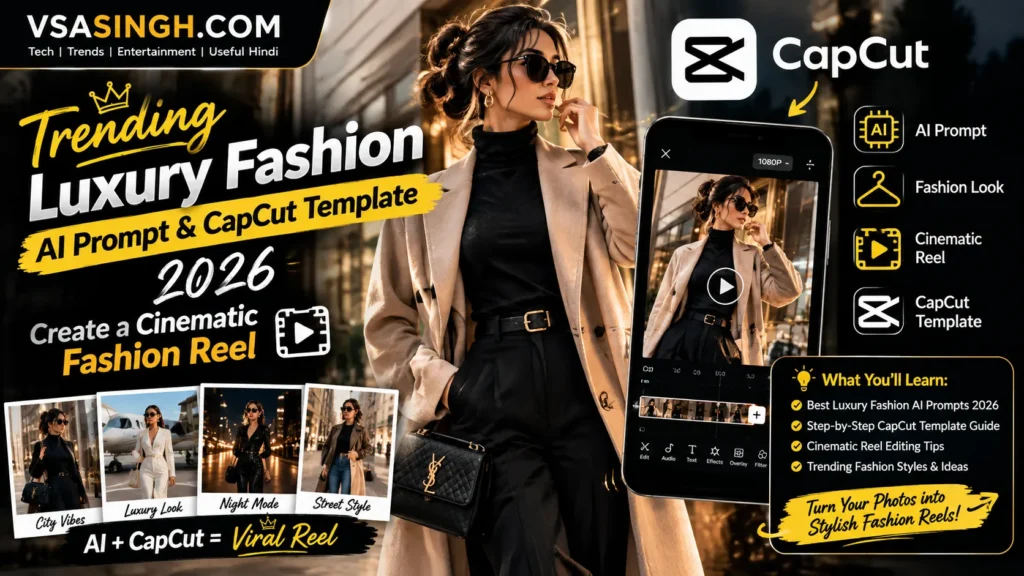
At vsasingh.com, this guide brings both parts together. First, you will find an original luxury fashion AI prompt. Then we will explain how to prepare the reference image, how to improve the AI result, how to turn your fashion photographs into a short video, and what to do when the generated image or editing template does not behave as expected.
The goal is not simply to make an image look expensive. A good luxury fashion edit should still feel believable, balanced and photographic.
What Is the Luxury Fashion AI Photo Trend?
The Luxury Fashion AI Photo Trend is a creative image-editing style in which an ordinary photograph is transformed into a premium fashion portrait. The final image may include elements commonly associated with professional fashion photography, such as:
- Dark studio backgrounds
- Premium furniture
- Tailored clothing
- Dramatic red or neutral lighting
- Editorial poses
- Professional camera aesthetics
- Strong contrast
- Detailed fabric textures
- Cinematic shadows
- Shallow depth of field
- High-end color grading
However, simply adding the word luxury to an AI prompt does not automatically produce a convincing fashion photograph. The AI needs to understand what kind of luxury you are trying to create.
For example, a modern editorial portrait could use a black outfit, chrome furniture, a dark crimson background and controlled studio lighting.
A street-luxury concept could instead use an expensive-looking urban location, evening lighting and a tailored outfit. A classic fashion campaign might use neutral colors, soft directional light and minimalist architecture. The prompt therefore needs to describe the complete visual environment rather than relying on a few fashionable keywords.
Best Luxury Fashion AI Photo Editing Prompt
Below is an original prompt created for this vsasingh.com guide. The prompt is designed around a sophisticated masculine fashion portrait with a dark crimson studio environment.
AI Prompt
Use the uploaded reference photograph as the primary identity reference. Preserve the person’s recognizable identity, natural facial structure, skin tone, hairstyle, eye shape, eyebrows, nose, lips, jawline and overall facial proportions. Do not replace the face with a different person and do not apply excessive beautification. Create an ultra-realistic cinematic luxury fashion portrait of the same person in a premium editorial studio environment. Composition: Create a vertical 9:16 full-body portrait. The subject is seated confidently on a modern chrome-and-black designer-style chair. His body is positioned naturally with a relaxed editorial posture, leaning slightly backward. One arm rests comfortably on the chair’s armrest while the other hand rests naturally near the thigh. Keep both legs anatomically correct and positioned in a sophisticated but believable fashion pose. Wardrobe: Dress the subject in an elegant all-black fashion outfit consisting of a premium black shirt with a slightly open collar, tailored black trousers and a fitted black blazer or luxury-style jacket. The clothing should have realistic stitching, folds, fabric texture and natural shadows. Do not add visible brand names, logos or copyrighted fashion markings. Face: Keep the entire face unobstructed. Both eyes must remain clearly visible and naturally directed toward the camera. Do not add sunglasses, blindfolds, masks, scarves or hair covering the eyes. Preserve the person’s recognizable appearance from the reference photograph. Lighting: Create a dramatic fashion studio lighting setup using a deep crimson-red background glow combined with a soft directional key light on the face. The red ambient light should remain mainly in the background while the subject’s face retains realistic skin tones. Use controlled contrast between the black clothing and the red environment. Background: Create a sophisticated dark crimson studio backdrop with subtle tonal gradients and realistic cinematic shadows. Keep the environment minimal and premium-looking rather than filling it with unnecessary objects. Photography style: Ultra-realistic professional fashion photography, high-end editorial campaign aesthetic, realistic DSLR camera characteristics, natural lens perspective, shallow depth of field, detailed fabric texture, realistic skin pores, accurate anatomy, natural hands and fingers, controlled highlights, soft shadows and premium cinematic color grading. Make the image look like a genuine professional fashion photograph rather than an illustration or artificial CGI render. Maintain realistic body proportions and natural posture. Avoid exaggerated muscles, artificial facial symmetry, plastic skin or excessive sharpening. Mood: sophisticated, confident, modern, elegant, cinematic and premium. Aspect ratio: 9:16 vertical. Quality: photorealistic, highly detailed, realistic texture, professional editorial photography.
How to Choose the Right Reference Photo
The reference image is one of the most important parts of AI photo editing. Even a detailed prompt cannot always compensate for an extremely poor source image.
For the best chance of getting a recognizable result, choose a photograph where:
- The face is clearly visible
- The image has reasonable resolution
- The subject is not heavily blurred
- The face is not hidden behind accessories
- The original lighting is reasonably natural
- The photograph does not contain extreme filters
- The head is not severely distorted
- The person’s hairstyle is reasonably visible
A front-facing or slightly angled portrait can be useful because the AI has more information about the facial structure. If the source photograph is extremely dark, blurry or compressed, the AI may have difficulty reproducing the person’s natural appearance accurately.
How to Fix the Face If AI Changes Your Appearance
Sometimes an AI-generated fashion portrait may look attractive but still fail to preserve the original person’s identity. If this happens, try a more direct instruction.
Identity Correction Prompt
Preserve the exact recognizable identity from the uploaded reference image. Do not redesign, replace, beautify or reinterpret the face. Keep the original eye shape, eyebrow structure, nose, lips, jawline, facial proportions and natural skin characteristics. Modify only the clothing, pose, lighting and environment required by the fashion concept.
This tells the AI that the fashion transformation should happen around the person rather than replacing the person.
How to Fix AI Hands and Fingers
Hands are one of the areas that can sometimes look unnatural in generated images. A fashion pose involving a chair and relaxed hands requires accurate anatomy. If you see extra fingers, strange wrists or merged hands, try: After the correction, inspect the hands again at full resolution.
Keep the face, outfit, lighting and background unchanged. Correct only the hands and arms. Create anatomically accurate hands with five natural fingers, realistic finger lengths, believable wrists and natural joints. Keep both hands in relaxed positions appropriate to the seated pose.
How to Make the Black Outfit Look Premium
A black outfit does not automatically look luxurious. The AI needs to create texture and lighting on the fabric. If the clothes look like a single flat black shape, add:
Show subtle realistic fabric texture, natural folds, stitching details and gentle highlights across the black clothing. Maintain deep black tones while preserving enough tonal variation to distinguish the shirt, trousers and blazer.
This is particularly useful in a dark environment. Without tonal variation, black clothing can disappear into the background.
Luxury Does Not Mean Adding More Objects
A common mistake in AI fashion prompts is adding too many luxury-related objects.
For example, someone might request:
- Expensive car
- Mansion
- Gold watch
- Designer bags
- Jewelry
- City skyline
- Luxury chair
- Neon lights
- Chandeliers
Creating a Female Luxury Fashion Version
The same basic concept can be adapted for a female fashion portrait. You can change the wardrobe section to:
Dress the subject in an elegant contemporary black fashion outfit with clean tailoring, refined fabric texture and understated styling. Avoid visible logos. Keep the overall appearance sophisticated, modern and editorial.
You can then choose between a seated pose, standing pose or close-up portrait. The lighting and crimson background can remain similar.
Creating a Couple Luxury Fashion Portrait
For a couple image, both identities should be preserved independently.
A useful instruction is:
Use both uploaded reference photographs as identity references. Preserve each person’s recognizable facial structure and natural appearance. Do not merge or alter their facial features. Create a sophisticated luxury fashion editorial scene with both subjects positioned naturally together.
This can be useful for creating coordinated couple portraits.
Turning Luxury Fashion Photos Into a Reel
Once you have generated several AI fashion photographs, you can turn them into a short video. This is where a CapCut template can become useful.
Instead of manually animating every photograph, a suitable template can provide a pre-designed sequence containing elements such as:
- Transitions
- Zoom movements
- Beat-based timing
- Motion effects
- Text animation
- Image cropping
- Music synchronization
The exact options available can vary depending on the template, app version, account and region. Therefore, it is better to treat a CapCut template as an editing starting point rather than expecting every template to work identically for every user.
How to Make a Luxury Fashion Reel With CapCut
Step 1: Prepare Your Images
Create several AI fashion photographs rather than relying on a single image.
For example, prepare:
- Full-body seated portrait
- Close-up face portrait
- Standing fashion portrait
- Side-angle portrait
- Detail shot of the outfit
Different compositions can make the final video feel more dynamic.
Step 2: Choose a Suitable Template
Look for a template that matches the visual mood of your photographs.
Search within the available CapCut template options for styles related to:
- Luxury fashion
- Cinematic fashion
- Model edit
- Fashion transition
- Editorial
- Black aesthetic
- Red cinematic
- Premium portrait
Template availability can change, so the exact results may differ over time.
Step 3: Add Your Photos
Once you choose a suitable template, follow its instructions to replace the sample media with your own images.
Some templates may require a specific number of photographs.
Others may support video clips.
Follow the template’s current on-screen instructions.
Step 4: Check Every Frame
Do not immediately export the Reel after inserting the photos.
Preview the complete sequence.
Check whether:
- The face is cropped
- Important clothing details disappear
- The image is stretched
- The transition covers the subject
- Text overlaps the face
- The timing feels too fast
- The music matches the mood
A luxury fashion edit generally benefits from clean presentation rather than excessive visual effects.
Current CapCut Template Link
If you already have a specific CapCut template link, you can use it directly through the CapCut app or supported web interface. Because templates can change, expire, become unavailable in certain regions, or be replaced by their creators, a template that works today may not necessarily behave the same way later. For that reason, always verify the template inside CapCut before planning your final Reel around it.
Tips for Making the Reel Look More Expensive
A premium appearance is not necessarily created by adding more effects. Instead, focus on consistency.
Try to keep:
- Similar color grading
- Similar lighting
- Consistent clothing
- Clean compositions
- High-resolution images
- Smooth transitions
- Limited text
- Controlled motion
If one photograph has a bright blue background and another has a dark red studio background, the Reel may feel less cohesive. If all photographs share a black, crimson and cinematic visual language, the final video can feel more like a single fashion campaign.
A Useful Negative Prompt
If your AI platform supports negative prompts, you can try:
cartoon, anime, illustration, CGI, 3D render, plastic skin, fake face, excessive beauty filter, altered identity, distorted facial structure, unrealistic eyes, extra fingers, malformed hands, duplicate limbs, bad anatomy, distorted chair, unrealistic clothing, floating objects, excessive saturation, neon overload, extreme HDR, harsh flash, oversharpening, watermark, logo, text, UI elements, artificial skin, unrealistic shadows
The effectiveness of negative prompts depends on the particular AI image tool, so treat this as a general guide rather than a guarantee.
How to Make the Photos Look Consistent
Consistency becomes especially important when several AI-generated images are combined into one Reel. If you create every image with a completely different prompt, the subject may appear to change from one frame to another.
Try to keep certain details consistent:
- Hairstyle
- Clothing color
- Skin tone
- Facial identity
- General lighting
- Background palette
- Camera style
You can change the pose while keeping the visual identity stable. This makes the final Reel feel more like one photoshoot rather than a collection of unrelated AI images.
Best Aspect Ratio for Luxury Fashion Images
The ratio should depend on where you plan to publish the image.
9:16
Best suited for:
- Instagram Reels
- Instagram Stories
- YouTube Shorts
- Facebook Reels
- Mobile wallpapers
4:5
Useful for:
- Instagram portrait posts
- Social media fashion posts
1:1
Useful for:
- Profile graphics
- Square social posts
16:9
Useful for:
- YouTube thumbnails
- Website banners
- Desktop visuals
For the fashion Reel concept described in this article, 9:16 is a practical choice.
FAQs
What is a Luxury Fashion AI Prompt?
What is a Luxury Fashion AI Prompt?
It is a detailed instruction used with an AI image-generation or editing tool to transform a normal photograph into a cinematic fashion portrait.
How do I keep my face unchanged?
How do I keep my face unchanged?
Clearly tell the AI to use the uploaded photograph as the identity reference and preserve recognizable facial characteristics.
Why do AI fashion images sometimes change the face?
Why do AI fashion images sometimes change the face?
Generative image tools may reinterpret facial features while following other instructions. Stronger identity-preservation directions and a better reference image can help.
Why are hands sometimes distorted?
Why are hands sometimes distorted?
Hands contain complex anatomical relationships, and image-generation systems can occasionally make mistakes. A focused hand-correction prompt can help.
What is the best ratio for a fashion Reel?
What is the best ratio for a fashion Reel?
A vertical 9:16 composition is generally appropriate for short-form vertical video platforms.
Can I use CapCut templates with AI-generated photos?
Can I use CapCut templates with AI-generated photos?
If the template supports photo replacement, you can generally add compatible images according to its current instructions. Availability and functionality can vary.
Will every CapCut template work on every device?
Will every CapCut template work on every device?
Not necessarily. Template availability, features and supported functionality can vary by app version, region, account and device.
Can I create a female luxury fashion version?
Can I create a female luxury fashion version?
Yes. Change the wardrobe, pose and styling instructions while keeping the same principles for lighting, composition and realistic photography.
Can I create a couple fashion Reel?
Can I create a couple fashion Reel?
Yes. Use separate reference images for each person when supported and explicitly instruct the AI to preserve both identities independently.
Final
The Trending Luxury Fashion AI Prompt & CapCut Template concept brings two creative processes together: AI image generation and short-form video editing.The first stage is creating a convincing fashion photograph. A clear reference image, realistic identity preservation, carefully selected clothing, controlled lighting and a simple premium background can make a significant difference.
The second stage is turning those photographs into a Reel. A suitable CapCut template can add movement and rhythm to still images, but the template should support the photographs rather than dominate them. Clean transitions, subtle motion and consistent visuals can often create a more polished fashion presentation than a video filled with effects.
You can also experiment with different color palettes, outfits, studio environments, camera angles and video templates. The same basic workflow can be adapted for men’s fashion, women’s fashion, couple portraits, portfolio images and social media campaigns. This guide has been written as an original AI fashion and editing resource for vsasingh.com, with fresh explanations, original prompt wording and practical editing guidance for creators.
Leave a Reply