
AI-generated couple Viral Couple AI Image have become a popular way to turn simple ideas into creative digital portraits. Instead of using a regular selfie, you can describe a location, outfit, mood, lighting, and overall scene, and an AI image generator can turn that idea into a completely different visual.
One of the easiest ways to experiment with this style is Bing Image Creator. You don’t need professional editing skills or complicated software. The most important part is giving the AI a clear prompt.
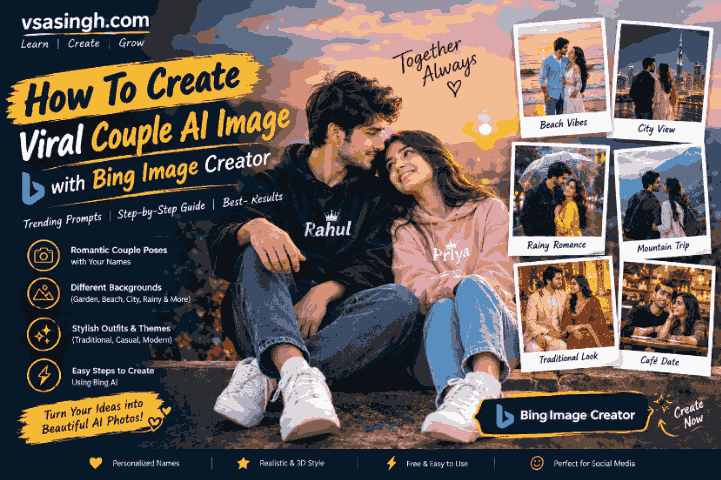
At vsasingh.com, we like keeping AI tutorials practical, so in this guide you’ll find ready-to-use couple AI image prompts, personalization ideas, and simple instructions for creating different styles. You can change the names, clothes, location, colors, and other details to make the result your own.
Note: AI-generated text can sometimes contain spelling mistakes, especially when you ask it to place names inside an image. Always check the final result before sharing it.
What Are Couple AI Images?
A couple AI image is a digitally generated picture created from a written description. You can describe two people, their outfits, surroundings, expressions, poses, lighting, and photography style, and the AI creates a visual based on those instructions.
For example, you could ask for:
- Two people sitting in a garden
- A couple walking through a city street
- A traditional Indian portrait
- A rainy-day scene
- A beachside photo
- A mountain background
- A festival-themed portrait
- A cinematic studio picture
- A personalized image with names
- A 3D-style social media profile picture
The fun part is that you’re not limited to one style. A simple prompt can be changed into a completely different concept just by replacing the background or clothing.
Best Couple AI Image Prompts
Below are some original prompts you can try with Bing Image Creator or a similar AI image tool.
Replace “NAME 1” and “NAME 2” with the names you want to use.
1. Couple Photo in a Beautiful Garden
If you want a simple and natural-looking image, start with a garden setting.
Create a realistic cinematic portrait of an adult Indian couple spending time together in a beautiful garden. One person is wearing a navy blue casual jacket with "NAME 1" written neatly on a small design, while the other is wearing a soft pink outfit with "NAME 2" written subtly on it. Surround them with green plants, colorful flowers and warm evening sunlight. Keep their expressions natural and relaxed. Use realistic skin texture, detailed clothing, soft background blur, natural shadows and professional photography quality.This type of prompt works well when you want the background to feel peaceful rather than overly dramatic.
2. City Skyline Couple Portrait
A city background can give your image a more modern look.
Generate a high-quality realistic portrait of an adult Indian couple standing together at a scenic city viewpoint during sunset. The person on the left is wearing a clean white shirt with the name "NAME 1" displayed subtly, while the other is wearing a stylish pastel outfit with "NAME 2" written in small elegant lettering. Show a modern city skyline in the distance, warm sunset light, realistic shadows and a cinematic atmosphere. Keep both faces clear and natural, with detailed clothing and professional photography depth.You can replace the city setting with any famous skyline you want, but using a general cityscape often gives the AI more flexibility.
3. Rainy Day Couple AI Prompt
Rain can add a completely different mood to an AI-generated photo.
Create a realistic cinematic photograph of an adult Indian couple standing together on a city street shortly after rainfall. They are carrying a transparent umbrella while soft rain continues around them. One person is wearing a dark blue jacket and the other is wearing a warm yellow outfit. Add subtle name details reading "NAME 1" and "NAME 2" on their clothing. The wet road should reflect the surrounding lights. Use realistic rain, natural facial details, soft city lights, shallow depth of field and high-quality photography.For a more realistic result, avoid asking the AI to add too many objects to the same scene.
4. Couple Photo at the Beach
A beach scene can work especially well for wide cinematic compositions.
Create a highly realistic photograph of an adult Indian couple walking along a peaceful beach during golden hour. One person is wearing a light blue shirt and casual trousers, while the other is wearing an elegant pastel-colored outfit. Add the names "NAME 1" and "NAME 2" as subtle personalized details on their clothing. Show waves, wet sand and a warm sunset in the background. Use natural body proportions, realistic facial features, soft sunlight, detailed clothing and cinematic depth of field.If you want a profile picture, add:
Keep both subjects centered and create a portrait-friendly composition.5. Mountain Background Couple Prompt
For a travel-inspired image, try a mountain setting.
Generate a realistic cinematic portrait of an adult Indian couple standing at a scenic mountain viewpoint. They are dressed in stylish casual winter clothing, with one wearing a dark jacket and the other wearing a cream-colored sweater. Add small personalized name details "NAME 1" and "NAME 2". Behind them are green mountains, misty clouds and a soft morning sky. Use realistic environmental lighting, detailed clothing, natural expressions, realistic skin texture and professional travel photography quality.This can give the image a travel-photo feel instead of the typical studio portrait.
6. Traditional Indian Couple Portrait
If you prefer an Indian cultural theme, use traditional clothing and architecture.
Create a beautiful realistic portrait of an adult Indian couple standing inside a traditional Indian courtyard decorated with flowers and warm lamps. The man is wearing an elegant cream-colored kurta and the woman is wearing a richly detailed saree. Add the names "NAME 1" and "NAME 2" in small elegant lettering on a decorative background element. Use warm golden lighting, realistic facial details, detailed fabric textures, natural shadows and authentic Indian architectural elements. The final image should look like professional cultural photography.You can change the clothing to a sherwani, lehenga, salwar suit, or another traditional style.
7. Festival-Themed Couple Image
Festivals can provide colorful backgrounds and interesting lighting.
Create a realistic festive portrait of an adult Indian couple standing together at a beautifully decorated celebration venue. Use traditional Indian clothing, flower decorations, warm lights and colorful festive details in the background. Add "NAME 1" and "NAME 2" as clean personalized text on a decorative sign behind them. Keep the scene respectful and natural, with realistic facial details, detailed clothing, balanced lighting and cinematic photography.You can adapt this prompt for different festivals by changing the decorations and colors. Viral Couple AI Image
8. Classic Black Outfit Couple Portrait
For a more stylish social media profile image, try a darker theme.
Create a premium realistic studio portrait of an adult Indian couple wearing elegant black outfits. They are standing beside each other against a dark textured background. Place "NAME 1 & NAME 2" in subtle glowing silver lettering behind them. Use soft rim lighting around their shoulders, realistic skin texture, detailed fabric, natural facial expressions, controlled shadows and a professional fashion photography composition. Keep the image sharp and uncluttered.A simple background can often make the subjects stand out more than a complicated scene.
9. White and Gold Luxury Theme
Generate a high-end realistic portrait of an adult Indian couple in an elegant white-and-gold studio environment. One person is dressed in a white traditional outfit and the other in a sophisticated cream-colored outfit. Display "NAME 1 & NAME 2" in refined golden lettering in the background. Add soft warm lighting, realistic skin texture, detailed fabric, subtle reflections and cinematic depth of field. Keep the composition clean, balanced and suitable for a social media portrait.10. Couple Sitting on a Bench
Sometimes a simple scene gives a more natural result.
Create a realistic photograph of an adult Indian couple sitting comfortably on a wooden park bench during a pleasant evening. They are wearing casual modern clothing and looking naturally toward the camera. Add their names, "NAME 1" and "NAME 2", in small elegant lettering on a decorative sign in the background. Surround the scene with trees, soft sunlight and a peaceful park environment. Use realistic faces, natural body proportions, detailed clothing, soft shadows and professional photography.11. Café-Themed Couple AI Prompt
For a cozy urban concept:
Create a realistic cinematic photograph of an adult Indian couple sitting at a stylish outdoor café during the evening. One person is wearing a casual denim jacket and the other is wearing a simple pastel outfit. Add "NAME 1" and "NAME 2" subtly on personalized accessories. Include warm café lights, wooden tables, plants and a softly blurred city background. Use realistic facial details, natural expressions, realistic lighting and professional lifestyle photography.12. Classic Motorcycle Travel Scene
If you want a travel-style image, a motorcycle can become part of the composition.
Create a realistic cinematic travel photograph of an adult Indian couple standing beside a classic motorcycle on a scenic countryside road. One person is wearing a denim jacket and the other is wearing a casual traditional-inspired outfit. Add "NAME 1" and "NAME 2" as small personalized details on their clothing. Show green hills, an open road and warm natural sunlight in the background. Use realistic proportions, detailed motorcycle textures, natural facial features and professional outdoor photography.13. Sunset Silhouette Couple Prompt
This version focuses more on the atmosphere than facial details.
Create a cinematic sunset scene featuring an adult couple standing together on a hilltop while looking toward the horizon. The sun is setting behind them, creating a warm golden glow and subtle silhouettes. Add their names "NAME 1 & NAME 2" in elegant text in the sky area without covering the subjects. Use realistic landscape details, natural lighting, soft clouds and professional cinematic photography.14. 3D Couple Profile Picture
For a more artificial 3D style:
Create a premium 3D-style profile portrait of an adult Indian couple standing together in a modern studio. Give the scene realistic human features, detailed clothing and soft cinematic lighting. Place "NAME 1 & NAME 2" in large glowing letters behind them. Add subtle depth, realistic shadows, a luxury background and polished 3D rendering while keeping the people natural and recognizable.15. Minimal Social Media Couple Portrait
Not every AI image needs a complicated background.
Create a clean realistic portrait of an adult Indian couple standing side by side against a simple neutral studio background. They are wearing stylish casual outfits and have natural relaxed expressions. Add "NAME 1 & NAME 2" in simple dark-gold lettering above them. Use soft professional lighting, realistic facial details, natural skin texture, sharp focus and a clean composition suitable for a social media profile picture.How to Personalize These Couple Prompts
The easiest way to make a generic AI prompt feel personal is to change a few important details.
Change the Names
Instead of:
"NAME 1 & NAME 2"you could write:
"vishal & gitanjali"Keep the names short whenever possible because image generators can struggle with longer text.
Change the Clothing
You can experiment with:
- Denim jacket
- Hoodie
- Kurta
- Saree
- Lehenga
- Sherwani
- Casual shirt
- Traditional outfit
- Winter jacket
- Formal clothing
Change the Location
Try:
- Garden
- Beach
- Mountain
- Café
- City street
- Temple courtyard
- Park
- Rooftop
- Countryside
- Studio
Change the Lighting
For different moods, use:
warm golden-hour lightingor:
soft morning lightand
cinematic evening lightingor:
soft studio lightingSmall changes like these can completely alter the final result.
How to Make AI Couple Photos Look More Realistic
Sometimes an AI-generated image looks obviously artificial. This usually happens because the prompt focuses too much on effects and not enough on realistic photography.
Try adding:
realistic skin texture, natural facial details, accurate proportions, realistic clothing folds, natural lighting, detailed environment, professional photography, shallow depth of fieldYou can also ask the AI to avoid common visual problems:
Avoid distorted hands, unnatural facial features, extra fingers, duplicate people, blurry faces, incorrect proportions and random text.Don’t expect every generation to be perfect. AI image generation is often a process of trying a prompt, checking the result, and adjusting a few details.
How to Keep the Faces More Consistent
If you’re creating an image based on reference photos and the tool supports image input, use clear images with good lighting.
A useful instruction can be:
Keep the main facial characteristics consistent with the provided reference images. Do not unnecessarily change the face shape, hairstyle or major facial features.However, AI tools can still produce differences. Face consistency isn’t guaranteed, so it’s better to treat the generated image as a creative interpretation rather than an exact photograph.
How to Get the Names Correct in AI Images
One of the most common problems with AI-generated pictures is incorrect text.
You might ask for:
vishal & gitabut the generator could produce something slightly different.
To improve your chances, use a direct instruction:
Display the exact text "vishal & gita" in large, clean, correctly spelled letters. Do not add extra words or characters.If the result is still incorrect, don’t keep adding more complicated instructions. Try a simpler background or generate the image without text and add the names afterward using an image editor.
How to Create a Couple AI Image With Bing Image Creator
The basic process is straightforward.
Step 1: Choose Your Prompt
Pick one of the prompts from this article according to the type of image you want.
Step 2: Customize It
Replace sample names and change the clothes, location, colors, or lighting.
Step 3: Open Bing Image Creator
Open Bing’s image-generation tool and sign in if required.
Step 4: Paste Your Prompt
Copy the complete prompt and place it into the prompt field.
Step 5: Generate the Image
Start the image-generation process and wait for the results.
Step 6: Check the Result
Look at the faces, hands, clothing, background and any written text.
Step 7: Improve the Prompt
If something isn’t right, change only the problematic part and generate another version.
For example, if the background is too busy, add:
Use a simple, clean background with minimal objects.If the faces aren’t clear:
Keep both faces sharp, well-lit and unobstructed.Why Your First AI Image May Not Look Perfect
It’s tempting to think that one prompt should produce the perfect image immediately. In practice, AI generation doesn’t always work that way.
The model has to interpret everything you describe. If the prompt contains too many people, objects, locations, text elements, lighting effects and camera instructions, some details may be ignored or changed.
A better approach is to build the image around a few key elements:
Subject → Clothing → Location → Lighting → Photography style
For example:
Adult Indian couple → traditional outfits → decorated courtyard → warm evening light → realistic photographyThat’s much easier for an image generator to understand than a prompt containing dozens of unrelated effects.
Common Problems With Couple AI Images
Problem 1: Extra People Appear
Try:
Show only two people in the entire scene.Problem 2: Faces Look Unnatural
Try:
Use realistic human facial features, natural skin texture and balanced facial proportions.Problem 3: Hands Look Incorrect
Try:
Show natural human hands with realistic proportions and clearly visible fingers.Problem 4: Background Takes Over the Image
Try:
Keep the couple as the main focus and softly blur the background.Problem 5: Names Are Wrong
Use shorter text or add the names after generating the image.
Problem 6: The Image Looks Like a Cartoon
Try:
Photorealistic professional photography, realistic textures and natural lighting.Couple AI Prompt for a Profile Picture
If your main goal is a social media profile picture, use a prompt specifically designed for that purpose:
Create a realistic square profile portrait of an adult Indian couple standing together against a stylish dark studio background. They are wearing coordinated modern outfits and have natural, confident expressions. Place "NAME 1 & NAME 2" in elegant glowing lettering behind them without covering their faces. Keep both subjects centered, faces sharp and clearly visible. Use soft cinematic lighting, realistic skin texture, detailed clothing, natural proportions and professional portrait photography.Couple AI Prompt for a Vertical Post
For a vertical social media post:
Create a realistic vertical portrait of an adult Indian couple walking together through a beautifully lit city street at sunset. They are wearing stylish coordinated outfits and have natural expressions. Add "NAME 1 & NAME 2" subtly in the background. Use warm evening light, realistic architecture, detailed clothing, natural skin texture, shallow depth of field and cinematic professional photography. Keep the subjects centered with enough space around them for a vertical social media post.Couple AI Prompt With a Simple Background
Sometimes less is more.
Create a highly realistic studio portrait of an adult Indian couple standing side by side against a clean beige background. Use elegant traditional clothing and natural expressions. Add their names "NAME 1 & NAME 2" in simple golden lettering above them. Use soft professional lighting, realistic skin texture, detailed clothing and natural shadows. Keep the composition minimal, balanced and suitable for a profile picture.Couple AI Prompt for a Travel Theme
Create a realistic travel photograph of an adult Indian couple standing at a beautiful scenic viewpoint. They are dressed in comfortable travel clothing and carrying small backpacks. Show mountains, trees and a wide open sky behind them. Add "NAME 1 & NAME 2" subtly on a small travel sign. Use natural daylight, realistic environmental details, sharp subjects, soft background depth and professional travel photography.Couple AI Prompt for a Night City Scene
Generate a cinematic realistic night portrait of an adult Indian couple standing on a modern city street surrounded by soft decorative lights. One person is wearing a dark jacket and the other is wearing a stylish warm-colored outfit. Display "NAME 1 & NAME 2" in subtle neon lettering on a distant sign. Use realistic reflections on the road, natural skin texture, detailed clothing, soft bokeh lights and professional nighttime photography.A Simple Formula for Writing Your Own Prompts
Once you understand the basic structure, you don’t have to depend on ready-made prompts every time.
Use this formula:
Create + subject + clothing + location + important details + lighting + camera style + quality
For example:
Create a realistic portrait of an adult Indian couple wearing traditional outfits, standing in a decorated garden during sunset. Add their names "NAME 1 & NAME 2" on a small elegant sign in the background. Use warm natural light, realistic facial details, detailed clothing, soft background blur and professional photography.You can then change just one element at a time.
Do You Need a Long Prompt?
Not necessarily.
A long prompt isn’t automatically a better prompt. What matters is whether the instructions are clear.
Instead of writing a huge paragraph filled with repeated words like beautiful, amazing, ultra-realistic, hyper-realistic, and 4K, focus on useful visual information.
For example:
Realistic adult couple, traditional Indian clothing, sunset garden, warm natural light, detailed faces, realistic fabric, soft background blur, professional portrait photography.This is short but still gives the AI enough direction.
Best Settings and Composition Ideas
The ideal composition depends on where you want to use the image.
For Profile Pictures
Ask for:
square composition, centered subjects, clear facesFor Social Media Posts
Try:
vertical portrait composition, cinematic framingFor Wallpapers
Use:
wide composition, subjects positioned slightly to one side, detailed backgroundFor Thumbnails
Ask for:
clear subjects, strong background separation, space for headline textCan You Add Names, Quotes, or Other Text?
Yes, but remember that AI-generated text isn’t always reliable.
Names generally work better than long sentences because there are fewer characters for the model to reproduce.
For important text, the safest workflow is:
- Generate the main image.
- Check the AI-generated text.
- If it’s incorrect, generate another version.
- If necessary, add the final text afterward using an editing tool.
This gives you much more control over the final design.
Frequently Asked Questions
Can I create couple photos with Bing Image Creator?
Yes. You can describe the people, clothing, location, lighting and photography style in the prompt and use the result as a creative AI-generated image. Viral Couple AI Image
Can I add names to the image?
Yes. Include the names in quotation marks and tell the AI to display them clearly. However, AI-generated lettering may sometimes contain mistakes.
Can I change the background?
Absolutely. Replace the garden with a beach, mountain, city, café, studio, park or another location.
Can I create traditional Indian couple portraits?
Yes. Mention the specific clothing and environment you want, such as a kurta, saree, lehenga, sherwani, traditional courtyard or decorated venue.
Why does my AI image look unrealistic?
This can happen when the prompt contains conflicting or overly complicated instructions. Try simplifying the prompt and adding realistic photography details.
Can I make the image look like a professional photograph?
Yes. Add terms such as professional photography, realistic skin texture, natural lighting, detailed clothing, realistic shadows, sharp focus, and shallow depth of field.
Can I create a 3D couple image?
Yes. Add a phrase such as:
Create a polished 3D portrait with realistic human features, detailed textures and cinematic lighting.What should I do if the names are incorrect?
Try generating the image again with shorter text. If the problem continues, create the image without text and add the names afterward using an image editor. Viral Couple AI Image
Can I change the clothing?
Yes. Clothing is one of the easiest parts of the prompt to customize. You can switch between traditional, casual, formal, festive, or travel outfits.
Can I use these prompts with other AI image generators?
Generally, yes. The exact interface and capabilities vary between tools, but the core prompt ideas can usually be adapted.
Final Thoughts
Creating a viral-style couple AI image doesn’t have to be complicated. The biggest difference usually comes from the prompt you give the image generator.
Start with a simple idea, describe the two subjects clearly, choose an interesting location, and then add the lighting and photography style you want. If you want a personalized design, add the names—but remember that AI-generated text may need a second attempt or a little editing afterward.
The prompts in this guide are meant to give you a starting point rather than lock you into one design. Change the outfits, locations, colors, camera angles, and atmosphere until you find a combination that feels right for your image.
At vsasingh.com, the goal is to make AI image creation easier to understand without making it unnecessarily complicated. So instead of copying the same prompt again and again, use these examples as a base and experiment with your own ideas.

Leave a Reply