
Have you noticed those stylish 3D Wing Chair Photo Prompt appearing on Instagram and Facebook? A person sits comfortably on a royal-looking chair, their name glows in the background, and the whole image looks like a luxury poster or a cinematic profile picture.
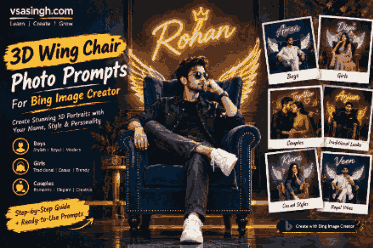
This type of image is popular because it combines three things people enjoy: a personalized name, a dramatic 3D design, and a professional-looking portrait. The good news is that you don’t need advanced photo-editing skills to create a similar image. With a clear photo idea and the right AI prompt, you can generate a creative wing chair portrait using Bing Image Creator.
In this guide, vsasingh.com shares original 3D wing chair prompts for boys, girls, and couples. You’ll also find prompts for traditional outfits, modern fashion, neon name effects, angel-inspired wings, and luxury studio backgrounds.
You can replace the sample names with your own name and adjust the clothing, colors, chair style, and background according to your preference.
Note: AI-generated text can sometimes contain spelling mistakes. If your name does not appear correctly, generate the image again or add the name later using an image-editing app.
What Is a 3D Wing Chair Photo?
A 3D wing chair photo is a digitally created portrait in which the subject is shown sitting on a large wingback chair. The chair usually has a royal, velvet, leather, or luxury appearance. The background may include neon lighting, a textured wall, smoke, glowing effects, or a large name written behind the subject.
Some designs also include soft wings, dramatic lighting, floating particles, or a studio-style atmosphere. These details make the image look more like a poster than an ordinary photograph.
A typical 3D wing chair image may include:
- A person sitting on a wingback chair
- A personalized name in the background
- Neon or glowing typography
- Traditional or modern clothing
- A dark studio wall
- Soft lighting around the subject
- A luxury or cinematic environment
- Realistic facial details
- 3D depth and shadow effects
- Decorative wings or glowing particles
The final result can be used as a profile picture, social media post, WhatsApp display photo, YouTube thumbnail, or personalized digital artwork.
Before You Use These AI Prompts
Before copying a prompt into Bing Image Creator, keep a few things in mind.
1. Replace the Sample Name
Most prompts below contain names such as Rishi, Arjun, Priya, Veer, or Aaliya. Replace the sample name with your own name.
For example:
Write "YOUR NAME" in bold glowing letters behind the chair.You can change it to:
Write "vsasingh" in bold glowing letters behind the chair.2. Keep the Prompt Clear
Avoid adding too many unrelated instructions. Tell the AI what the subject is wearing, where the person is sitting, what should appear in the background, and what type of lighting you want.
3. Use a Clear Reference Photo When Available
If you want the generated portrait to resemble you, upload a clear front-facing photo when the tool supports image input. A well-lit photo usually gives the AI a better reference than a blurry or heavily edited picture.
4. Check the Generated Name
AI tools may change letters, add extra characters, or misspell a name. If the name is important, check it carefully before using the image publicly.
3D Wing Chair Photo Prompts for Boys
1. Royal Wing Chair Prompt for Boys
This prompt is suitable for a traditional and elegant profile picture.
Create a high-quality realistic 3D portrait of a young Indian man sitting confidently on a luxurious velvet wingback chair. He is wearing a clean white kurta, matching pajama and stylish white sneakers. His posture is relaxed, and he is looking slightly toward the camera with a calm and confident expression. Behind the chair, display the name "YOUR NAME" in large glowing blue letters on a dark charcoal wall. Add subtle soft wings behind his shoulders, warm studio lighting, realistic facial features, detailed fabric texture, natural shadows and a premium cinematic atmosphere. Make the image look like a professional 3D profile picture.2. Traditional Kurta Wing Chair Prompt
Design a realistic 3D profile image of a young Indian man seated on a large royal wingback chair with deep blue velvet upholstery. He is dressed in a stylish cream-colored kurta with a light-colored stole and clean traditional footwear. His expression should be friendly and confident. The background should contain a dark textured wall with the name "YOUR NAME" written in elegant golden neon lettering. Add soft golden light around the chair, realistic shadows, detailed clothing, sharp facial features and a luxurious studio setting.3. Black Sherwani and Neon Name Prompt
Create a cinematic 3D portrait of a young Indian man sitting on a dark leather wingback chair. He is wearing a modern black sherwani with subtle embroidery and black shoes. His pose is relaxed, with one arm resting on the chair and his face turned slightly toward the camera. Behind him, write "YOUR NAME" in bright neon yellow letters on a textured black wall. Use dramatic side lighting, realistic skin texture, soft shadows, detailed leather, a premium fashion-poster look and high-resolution 3D rendering.4. Casual Streetwear Wing Chair Prompt
Generate a stylish realistic 3D portrait of a young man sitting casually on a vintage brown leather wingback chair. He is wearing a denim jacket, plain T-shirt, relaxed-fit trousers and clean sneakers. His expression is natural and confident. The background should be a dark urban-style studio wall with the name "YOUR NAME" displayed in bright white neon letters. Add subtle blue and purple lighting, realistic clothing folds, detailed chair texture, cinematic depth of field and a modern social media profile picture style.5. Angel-Inspired Wing Chair Prompt
Create a high-quality realistic 3D portrait of a young Indian man seated on an elegant velvet wingback chair. He is wearing a simple white kurta with white sneakers and has a peaceful, confident expression. Add soft white feather-like wings behind him without covering his face or clothing. Place the name "YOUR NAME" in glowing silver letters on the dark wall behind the chair. Use gentle warm lighting, realistic shadows, detailed feathers, natural skin texture and a clean cinematic composition.6. Royal Blue Theme Prompt
Create a luxurious 3D profile picture of a young man sitting on a royal blue wingback chair. He is wearing a white shirt, dark trousers and stylish shoes. The background should feature a deep navy wall with "YOUR NAME" written in large electric-blue neon letters. Add soft spotlighting, subtle glowing particles, realistic facial details, high-quality chair texture, natural body proportions and a polished studio photography effect.7. Red and Black Luxury Prompt
Generate a dramatic 3D portrait of a young Indian man sitting on a red velvet wingback chair in a dark luxury studio. He is dressed in a black jacket, black trousers and formal shoes. His expression is serious but natural, and he is looking toward the camera. Behind him, display "YOUR NAME" in bold red and white neon lettering. Add controlled studio lighting, realistic shadows, detailed velvet texture, cinematic contrast and a premium poster-style composition.3D Wing Chair Photo Prompts for Girls
1. Elegant Traditional Wing Chair Prompt
Create a beautiful realistic 3D portrait of a young Indian woman sitting gracefully on a luxurious velvet wingback chair. She is wearing an elegant pastel-colored traditional outfit with delicate jewelry and neatly styled hair. Her expression is calm and confident. Behind the chair, write "YOUR NAME" in glowing pink letters on a dark blue textured wall. Add soft lighting, realistic skin texture, detailed fabric, natural shadows and a premium cinematic profile picture style.2. Lehenga Wing Chair Prompt
Design a high-quality 3D profile picture of a young Indian woman seated on a royal wingback chair with rich velvet upholstery. She is wearing a beautiful traditional lehenga with subtle embroidery and matching accessories. Her pose should look graceful and natural. The background should feature her name "YOUR NAME" in elegant golden neon lettering. Add warm studio light, detailed clothing, realistic facial features, soft shadows and a luxurious festive atmosphere.3. Modern Fashion Wing Chair Prompt
Create a realistic 3D portrait of a young woman sitting comfortably on a vintage leather wingback chair. She is wearing a stylish jacket, a simple top, fitted trousers and sneakers. Add small statement earrings and a confident natural expression. Behind her, display the name "YOUR NAME" in bright red neon letters on a dark textured wall. Use cinematic lighting, realistic clothing folds, detailed leather, subtle depth of field and a modern fashion-poster look.4. White Outfit and Silver Neon Prompt
Generate a premium 3D profile picture of a young Indian woman sitting on a white or cream velvet wingback chair. She is wearing an elegant white traditional outfit with minimal jewelry. Her expression should be soft and confident, with her face clearly visible. Write "YOUR NAME" in glowing silver letters behind the chair on a dark gray wall. Add soft white lighting, realistic shadows, detailed fabric, natural skin texture and a clean luxury studio background.5. Pink Neon Wing Chair Prompt
Create a stylish realistic 3D portrait of a young woman sitting on a deep purple velvet wingback chair. She is wearing a fashionable pink outfit with subtle accessories and clean footwear. Her pose should be relaxed and graceful. The background should contain a dark navy wall with "YOUR NAME" written in bright pink neon lettering. Add soft glowing light, realistic facial details, detailed velvet texture, cinematic depth and a polished social media profile picture style.6. Soft Angel Wing Chair Prompt
Create a realistic 3D portrait of a young Indian woman seated on an elegant velvet wingback chair. She is wearing a simple cream-colored outfit with delicate jewelry. Add soft, artistic feather-like wings behind her shoulders while keeping her face and outfit clearly visible. Place "YOUR NAME" in glowing white letters on the dark background. Use warm studio lighting, natural facial details, realistic fabric, soft shadows and a peaceful premium portrait style.7. Black Outfit Luxury Prompt
Generate a cinematic 3D profile picture of a young woman sitting confidently on a black leather wingback chair. She is wearing a stylish black outfit with subtle silver accessories. Her expression should be confident and natural. Behind the chair, write "YOUR NAME" in bold golden neon letters on a dark textured wall. Add dramatic side lighting, realistic skin texture, detailed leather, natural shadows and a high-end fashion photography effect.3D Wing Chair Prompts for Couples
1. Elegant Couple Wing Chair Prompt
Create a realistic 3D portrait of an adult Indian couple sitting together on a luxurious velvet wingback chair. The man is wearing a neat white kurta and the woman is wearing an elegant traditional outfit. They are sitting comfortably with a natural, respectful pose and warm expressions. Behind them, display the names "NAME 1 & NAME 2" in glowing golden letters on a dark textured wall. Add soft studio lighting, realistic facial details, detailed clothing, natural shadows and a premium cinematic profile picture style.2. Traditional Couple Portrait
Generate a high-quality 3D portrait of an adult Indian couple seated gracefully on a royal blue wingback chair. The man is wearing a cream kurta with a matching stole, while the woman is wearing a beautiful saree with subtle jewelry. Their expressions should be natural and peaceful. Write "NAME 1 & NAME 2" in elegant white neon lettering behind the chair. Add warm golden lighting, realistic skin texture, detailed fabric, soft shadows and a luxury studio atmosphere.3. Modern Couple Wing Chair Prompt
Create a stylish realistic 3D profile picture of an adult couple sitting together on a vintage brown leather wingback chair. The man is wearing a dark jacket and sneakers, while the woman is wearing a modern outfit with simple accessories. Their pose should look comfortable and natural. Behind them, display "NAME 1 & NAME 2" in bright blue neon letters on a dark gray wall. Use cinematic lighting, realistic clothing details, natural facial expressions, soft depth of field and a premium social media poster style.4. Black and White Couple Theme
Create a cinematic 3D portrait of an adult Indian couple sitting on a large black velvet wingback chair. The man is dressed in a black suit, and the woman is wearing an elegant white outfit. They should have relaxed, natural expressions and realistic body proportions. Place "NAME 1 & NAME 2" in glowing silver letters behind them. Add soft monochrome-inspired lighting with subtle warm highlights, detailed fabric, realistic shadows and a luxury editorial photography effect.5. Golden Royal Couple Prompt
Generate a luxurious realistic 3D image of an adult couple seated on a royal golden-brown wingback chair. The man is wearing a traditional kurta, and the woman is wearing a detailed saree. Add a dark studio background with golden light rays and the names "NAME 1 & NAME 2" written in elegant glowing letters. Use realistic facial details, natural expressions, detailed clothing, soft shadows, cinematic depth and a premium royal portrait composition.6. Minimal Couple Profile Picture
Create a clean and realistic 3D profile picture of an adult Indian couple sitting comfortably on a simple velvet wingback chair. Keep the clothing elegant and the expressions natural. Use a plain dark background with "NAME 1 & NAME 2" written in simple white glowing text. Avoid unnecessary objects and excessive effects. Focus on realistic faces, natural body proportions, soft studio lighting, detailed clothing and a professional profile picture composition.Personalized Wing Chair Prompt Template
If you want to create your own prompt instead of using a ready-made one, follow this structure:
Create a realistic 3D portrait of a [person description] sitting on a [chair style] wingback chair. The subject is wearing [outfit details] and has a [natural expression]. Place the name "[YOUR NAME]" in [text color] glowing letters behind the chair on a [background style] wall. Add [lighting style], realistic facial details, detailed clothing, natural shadows, cinematic depth of field and a premium profile picture composition.You can customize the sections like this:
- Person description: young man, young woman, adult couple
- Chair style: velvet, leather, royal, vintage, modern
- Outfit: kurta, saree, sherwani, lehenga, jacket, suit
- Text color: blue, white, gold, pink, red, silver
- Background: dark studio wall, textured wall, luxury room
- Lighting: warm, cinematic, neon, soft, dramatic
How to Create a 3D Wing Chair Image in Bing Image Creator
Follow these simple steps:
- Open Bing Image Creator.
- Sign in with your Microsoft account if required.
- Choose one prompt from this article.
- Replace the sample name with your own name.
- Paste the complete prompt into the prompt box.
- Click the Create button.
- Wait for the AI-generated images to appear.
- Check the face, clothing, chair, background and name.
- Generate another version if the result is not accurate.
- Save the image or use it as your profile picture.
You can also make small changes to the prompt after the first result. For example, you can ask for a blue chair instead of a red chair, a traditional outfit instead of a modern outfit, or a softer background instead of a dramatic one.
How to Add Your Name Correctly
AI image generators are improving, but they can still make mistakes with written text. To improve the result, use a short instruction such as:
Write the name "YOUR NAME" clearly in large, correctly spelled letters behind the chair.You can also add:
Do not add extra letters, symbols or random words to the name.However, even with these instructions, the text may not always be perfect. If the name is incorrect, try a new generation with a simpler background. Another option is to create the portrait without text and add your name afterward using Canva, Photoshop, or another editing tool.
Tips for More Realistic 3D Results
Use Realistic Photography Words
Include phrases such as:
- Realistic facial details
- Natural skin texture
- Professional studio photography
- Cinematic lighting
- High-resolution portrait
- Detailed fabric texture
- Realistic shadows
- Natural body proportions
- Soft depth of field
- Premium 3D rendering
Avoid Too Many Effects
Adding neon, smoke, wings, fire, glowing particles, multiple lights, and several background objects at the same time can make the image look crowded. Start with a simple design and add only the effects that matter.
Keep the Face Visible
If you want a good profile picture, clearly instruct the AI to keep the face visible:
Keep the subject’s face clear, sharp and unobstructed.Describe the Chair Properly
A wingback chair should have tall sides or “wings” near the backrest. If the AI creates an ordinary chair, add:
Use a large classic wingback chair with tall curved side wings and a deep cushioned seat.Choose a Suitable Image Ratio
For profile pictures, a square image usually works well. For Instagram posts or story designs, you can ask for a vertical composition.
Useful instructions include:
Create a square composition suitable for a social media profile picture.or:
Create a vertical portrait composition suitable for an Instagram story.Common Problems and Their Solutions
The Chair Does Not Look Like a Wing Chair
Add more detail about the chair:
A large classic wingback chair with tall curved side panels, a deep cushioned seat and luxury velvet upholstery.The Name Is Misspelled
Use a shorter name, simplify the background, or add the name later in an editing app.
The Face Looks Different
Use a clearer reference image and add:
Keep the person’s facial structure, hairstyle and main facial features consistent with the reference photo.The Image Looks Like a Cartoon
Add realistic photography terms and remove words such as cartoon, fantasy illustration, or animated style.
The Wings Cover the Face
Add this instruction:
Keep the wings behind the shoulders and do not cover the face, hair or clothing.The Image Looks Too Dark
Use:
Bright but soft studio lighting, clear facial details and balanced exposure.The Background Is Too Busy
Add:
Use a clean dark studio background with minimal decorative elements.Short 3D Wing Chair Prompt
If you want a quick prompt, use this:
Create a realistic 3D profile picture of a young Indian person sitting on a luxurious velvet wingback chair. Add the name "YOUR NAME" in glowing neon letters on a dark textured wall behind the chair. Use stylish clothing, realistic facial details, natural shadows, cinematic lighting, detailed chair texture and a premium studio photography look.Prompt for a Luxury Profile Picture
Generate a premium realistic 3D profile portrait of a young Indian man sitting confidently on a large royal velvet wingback chair. He is wearing an elegant traditional outfit with clean footwear. The background is a dark luxury studio wall with "YOUR NAME" written in large golden neon letters. Add soft spotlighting, realistic skin texture, detailed fabric, natural shadows, subtle glowing particles and cinematic depth of field. Keep the face clear and the composition suitable for a square social media profile picture.Best Prompt for a Traditional Girl Portrait
Create a realistic 3D profile picture of a young Indian woman sitting gracefully on a royal velvet wingback chair. She is wearing an elegant traditional outfit with subtle jewelry. Behind her, display "YOUR NAME" in glowing pink and white letters on a dark textured wall. Add soft studio lighting, realistic facial features, detailed clothing, natural shadows and a premium cinematic portrait style. Keep the face clear and the image suitable for a social media profile picture.Best Prompt for a Couple Profile Picture
Create a realistic 3D profile portrait of an adult Indian couple sitting together on a luxurious wingback chair. The man is wearing a traditional kurta and the woman is wearing an elegant saree. Their expressions should be natural and peaceful. Display "NAME 1 & NAME 2" in glowing golden letters behind the chair. Add realistic facial details, detailed clothing, cinematic lighting, natural shadows and a premium studio background.More Creative 3D Wing Chair Ideas
1. Vintage Studio Wing Chair
Create a realistic vintage-style 3D portrait of a young Indian man sitting on a dark brown antique wingback chair. He is wearing a classic cream kurta with a simple wristwatch and polished shoes. The background should look like an old photography studio with a textured wall and soft warm light. Write "YOUR NAME" in elegant golden letters behind the chair. Add realistic facial features, detailed wood and leather textures, natural shadows and a timeless professional portrait style.2. Blue Neon Gaming Style
Create a high-quality 3D profile picture of a young man sitting on a black leather wingback chair in a modern gaming-inspired studio. He is wearing a black hoodie and sneakers. Blue neon lights glow softly around the chair, while "YOUR NAME" appears in bright electric-blue letters on the wall behind him. Keep the face realistic and clear. Add cinematic lighting, detailed clothing, realistic leather texture, soft shadows and a sharp digital portrait effect.3. White Luxury Chair Prompt
Generate a clean realistic 3D portrait of a young Indian woman sitting on a white velvet wingback chair in a luxury studio. She is wearing a pastel-colored outfit with minimal accessories. The background is light gray with the name "YOUR NAME" written in soft gold lettering. Use bright natural studio lighting, realistic facial details, smooth shadows, detailed fabric and a high-end editorial photography style.4. Festival-Themed Wing Chair Prompt
Create a realistic 3D portrait of a young Indian person sitting on a royal velvet wingback chair during a festive celebration. The subject is wearing an elegant traditional outfit. Add subtle flowers, warm lights and decorative elements in the background without making the scene crowded. Write "YOUR NAME" in glowing golden letters behind the chair. Use realistic skin texture, detailed clothing, natural facial features, cinematic lighting and a premium festive profile picture style.5. Minimal Black Background Prompt
Create a professional realistic 3D profile picture of a young Indian person sitting on a classic black wingback chair. The subject should wear a simple stylish outfit and look directly at the camera. Use a plain black background with "YOUR NAME" written in clean white letters. Avoid extra objects, heavy effects and distracting decorations. Focus on realistic facial details, natural proportions, soft studio lighting and a sharp premium portrait.6. Golden Light Portrait
Generate a cinematic 3D portrait of a young Indian man sitting on a luxurious brown velvet wingback chair. He is wearing a traditional cream outfit with a matching stole. A soft golden spotlight should fall on his face and shoulders. Behind him, write "YOUR NAME" in elegant glowing gold lettering. Add realistic skin texture, detailed fabric, natural shadows, soft background blur and a royal photography atmosphere.7. Purple Neon Fashion Prompt
Create a stylish realistic 3D portrait of a young Indian woman sitting on a dark velvet wingback chair. She is wearing a modern purple outfit with simple accessories. The background should feature a dark studio wall with "YOUR NAME" written in glowing purple and white neon letters. Add cinematic lighting, realistic facial details, detailed clothing, soft shadows and a polished fashion-poster composition.Frequently Asked Questions
Can I create a 3D wing chair image for free?
You can try these prompts with Bing Image Creator or another AI image-generation platform that offers image creation. Availability, limits, and account requirements may vary.
Can I use these images as a profile picture?
Yes. A square composition is usually suitable for profile pictures. You can also ask the AI to keep the subject centered and leave enough space around the face.
Why does the AI create the wrong text?
AI image generators sometimes struggle with letters and names. Try using shorter text, reducing background details, or adding the final name later with an editing tool.
Final Thoughts
3D wing chair portraits are a simple way to create a personalized and stylish social media image. The main elements are a large wingback chair, a clear subject, attractive lighting, and a name displayed in the background.
Start with one of the prompts in this article and change the details according to your style. You can experiment with traditional clothing, modern fashion, royal colors, neon text, soft wings, or a minimal studio background.
For the best result, keep the prompt clear, use realistic photography language, and always check the generated name before sharing the image.
If you enjoy creating personalized AI images, keep visiting vsasingh.com for more creative photo prompts, editing ideas, and AI image-generation tutorials.
Leave a Reply