
Ram Navami AI Prompt is a special occasion for devotees, and these days many people also like to create festive AI images to share on social media. A well-written prompt can turn a simple idea into a detailed devotional scene with traditional outfits, temples, saffron flags, and a beautiful festive atmosphere.
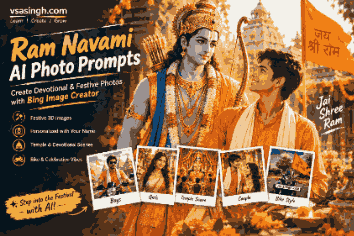
At vsasingh.com, we’re sharing some easy-to-use Ram Navami AI photo prompts that you can try with Bing Image Creator and other AI image-generation tools.
You can use these prompts to create devotional portraits, festival-themed bike photos, temple scenes, and personalized images with your name.
Ram Navami AI Image Prompts
The prompts below are designed to give your AI-generated images a strong Ram Navami feel while keeping the scene detailed and visually attractive.
🧡 Ram Navami Prompt for Boys
Prompt:
Create a highly realistic Ram Navami festival portrait of a young Indian man standing beside a stylish classic motorcycle. He is wearing a traditional saffron-colored kurta with a white scarf, with the name "YOUR NAME" clearly printed on a small decorative badge. A saffron flag with a simple devotional Ram symbol is attached to the motorcycle. In the background, show a beautifully decorated temple entrance, flowers, warm lights and several people celebrating Ram Navami. Add a peaceful festive atmosphere, natural lighting, realistic skin texture, cinematic photography, detailed surroundings, subtle film depth and ultra-realistic quality.Tip: Replace “YOUR NAME” with the name you want to display.
🙏 Devotional Lord Rama AI Prompt
If you want something more spiritual rather than a social-media-style portrait, try this prompt:
Create a beautiful realistic devotional scene featuring Lord Rama standing gracefully with his traditional bow inside a grand Indian temple. A young devotee is standing respectfully nearby, looking toward Lord Rama with a peaceful expression. The temple is decorated with flowers, diyas and traditional festive decorations for Ram Navami. Warm golden light fills the scene, creating a calm and divine atmosphere. Add elegant "Jai Shree Ram" festive lettering in the background, realistic details, cinematic lighting, natural colors and high-quality digital photography.🏹 Personalized Ram Navami Prompt
Want to add your own name to the image? Use this version:
Generate a realistic Ram Navami celebration scene featuring a young Indian devotee wearing a saffron traditional outfit. Write the name "YOUR NAME" clearly on the outfit in clean white lettering. Lord Rama should appear respectfully in the background holding his bow. Surround the scene with a beautifully decorated temple, flowers, diyas and saffron flags. The atmosphere should feel peaceful, devotional and festive. Use realistic facial details, natural lighting, cinematic composition, sharp focus and highly detailed textures. Make sure the personalized name is spelled correctly and easy to read.🌸 Ram Navami Prompt for Girls
Here is a separate prompt for creating a festive portrait with a traditional look:
Create a high-quality realistic portrait of a young Indian woman celebrating Ram Navami. She is wearing an elegant saffron and cream traditional outfit with subtle ethnic jewelry. She is standing outside a beautifully decorated temple surrounded by marigold flowers, diyas and saffron flags. A peaceful festive crowd can be seen softly in the background. Use warm evening lighting, realistic skin texture, natural facial details, cinematic depth of field and authentic Indian festival decorations. The final image should look like a professional photograph rather than an illustration.🛕 Temple Festival Scene Prompt
For a more detailed festival atmosphere, try this:
Create a cinematic and realistic Ram Navami celebration inside a beautifully decorated Indian temple. Show Lord Rama's traditional devotional representation at the center with flowers and diyas surrounding the area. Devotees are celebrating respectfully, saffron flags and festive decorations are visible throughout the temple, and warm golden lights create a peaceful atmosphere. Add realistic architectural details, natural shadows, soft depth of field, detailed decorations and professional photography quality.🚩 Ram Navami Bike Photo Prompt
For the popular bike-photo style, this prompt can work well:
Create a realistic cinematic photo of a young Indian man riding a classic motorcycle during a Ram Navami celebration. He is dressed in a stylish saffron kurta and white pants. A saffron devotional flag is attached to the motorcycle. Several decorated vehicles and festival participants can be seen in the distance. The road is surrounded by festive decorations and warm evening lights. Capture the scene from a slightly low camera angle with realistic motion, natural shadows, detailed clothing, authentic Indian surroundings and high-resolution photography.✨ How to Create a Ram Navami Image With Bing Image Creator
Creating the image is fairly simple.
- Open Bing Image Creator.
- Choose one of the prompts from this article.
- Change “YOUR NAME”
- Paste the complete prompt into the image generator.
- Start the generation process.
- If the result doesn’t look right, modify the clothing, background, lighting or camera angle and generate it again.
For personalized images, keep the name short because AI image generators can sometimes struggle with longer text.
How to Get Better Results From AI Prompts
A few small changes can make a noticeable difference.
Use clear instructions: Instead of simply saying “make a Ram Navami photo,” describe the clothing, location, lighting and overall mood.
Mention realistic photography: Words such as realistic photography, natural lighting, detailed textures, and cinematic depth of field can help create a more photographic result.
Keep the scene focused: Too many objects or instructions can make the final image messy. Start with the main subject and then add the important festival elements.
Check generated text: AI image tools don’t always spell names and festival messages correctly. If text is important, generate the image first and consider adding the final wording separately in an image editor.
Can You Add Your Name to a Ram Navami AI Photo?
Yes. You can include a name in the prompt, such as:
Write "YOUR NAME" clearly on the saffron outfit in simple white lettering. Keep the spelling accurate and readable.Just remember that AI image generators may still produce incorrect lettering. If the name is not correct, try generating another version.
Best Ram Navami AI Prompt for Social Media
If you want one simple prompt to start with, use this:
Create a stunning realistic Ram Navami festival portrait of a young Indian devotee wearing an elegant saffron traditional outfit. Place him in front of a beautifully decorated Indian temple with flowers, diyas and saffron flags. Add a peaceful devotional atmosphere, warm golden lighting, realistic facial details, natural skin texture, cinematic photography, shallow depth of field and highly detailed surroundings. Make the image look authentic, respectful and suitable for a festive social media post.Final Thoughts
Ram Navami is about devotion, celebration and the spirit of Lord Rama. With the right AI prompt, you can create a festive image that reflects that atmosphere while adding your own creative touch.
Whether you want a traditional portrait, temple scene, personalized photo or Ram Navami bike image, the prompts above give you a good starting point. Try changing the outfit, background and lighting to create a version that matches your style.
Jai Shree Ram! 🚩
Leave a Reply